
Showpad eOS
Showpad eOS
Showpad eOS
Showpad eOS
Enable your revenue teams to align around a single source of truth
Enable your revenue teams to align around a single source of truth
Enable your revenue teams to align around a single source of truth
" height="20.000008178703354px" id="he3b8_2iz" transform="translate(8 8)" width="20px"/></svg>)
SECTOR
SECTOR
SECTOR
Sales enablement, sales content management, buyer engagement, sales readiness
Sales enablement, sales content management, buyer engagement, sales readiness
Sales enablement, sales content management, buyer engagement, sales readiness
USED BY
USED BY
USED BY
2000+ sales organizations
2000+ sales organizations
2000+ sales organizations
PRODUCT
Responsive web app
Responsive web app
Responsive web app
TIMELINE
TIMELINE
TIMELINE
5+3 months
5+3 months
5+3 months
When Showpad reached out to littlevoice, my design agency at the time, Showpad Sales Enablement platform has been entering a new era. After multiple years of organic growth, the platform had expanded beyond the in-house design team's capacity.
When Showpad reached out to littlevoice, my design agency at the time, Showpad Sales Enablement platform has been entering a new era. After multiple years of organic growth, the platform had expanded beyond the in-house design team's capacity.
Given the limited timeframe, we agreed that the in-house design team would focus on immediate improvements to the client-facing environment — the one sellers used to present materials, pitch products, and close deals. littlevoice would take ownership of the Online Platform (OP), the environment used by content managers to create, organize, and manage assets for the sales team.
Given the limited timeframe, we agreed that the in-house design team would focus on immediate improvements to the client-facing environment — the one sellers used to present materials, pitch products, and close deals. littlevoice would take ownership of the Online Platform (OP), the environment used by content managers to create, organize, and manage assets for the sales team.
MY ROLE
MY ROLE
MY ROLE
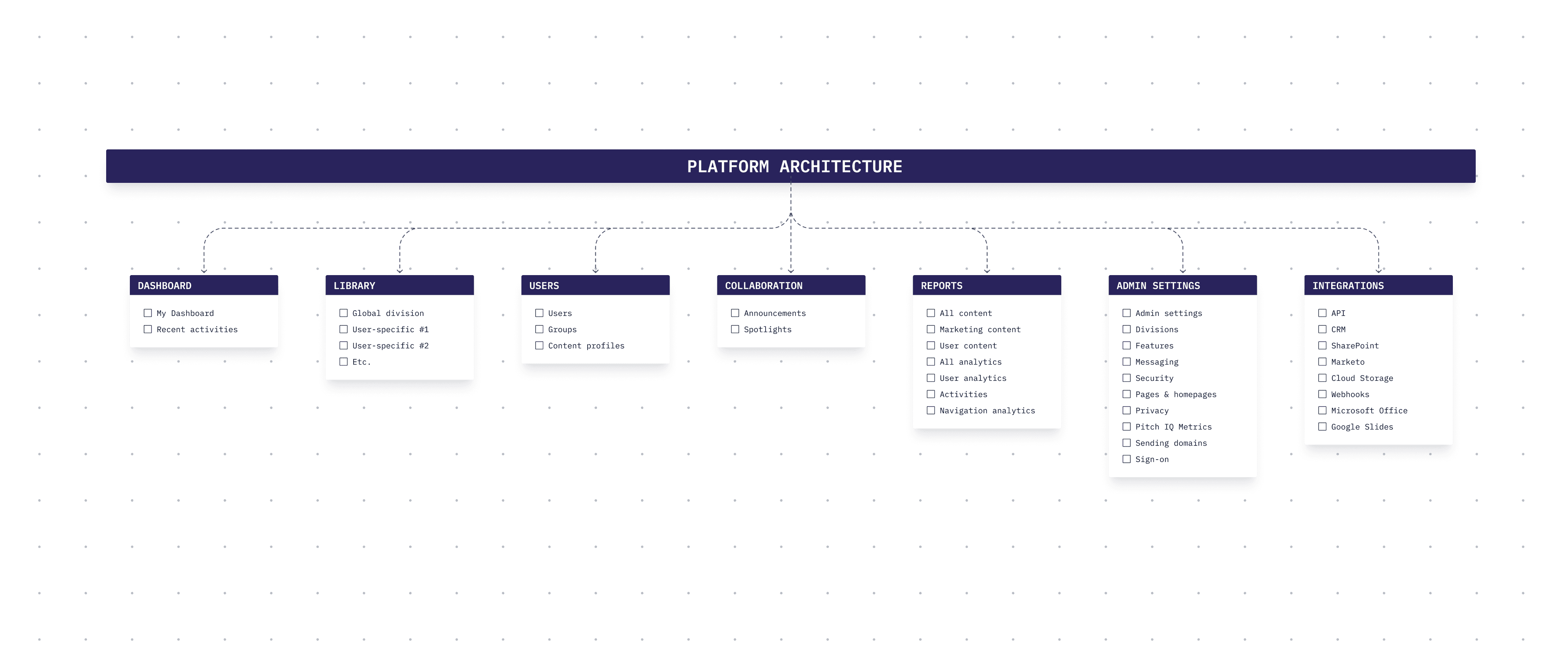
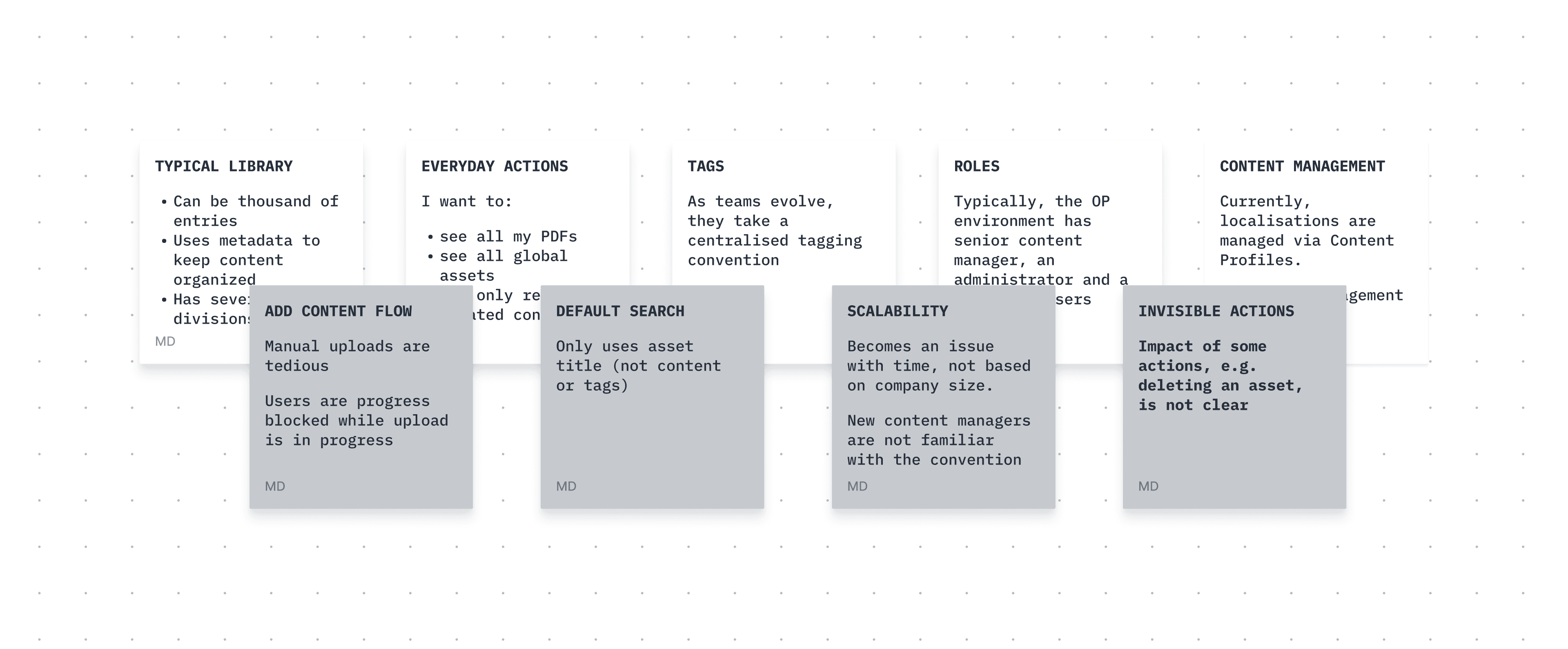
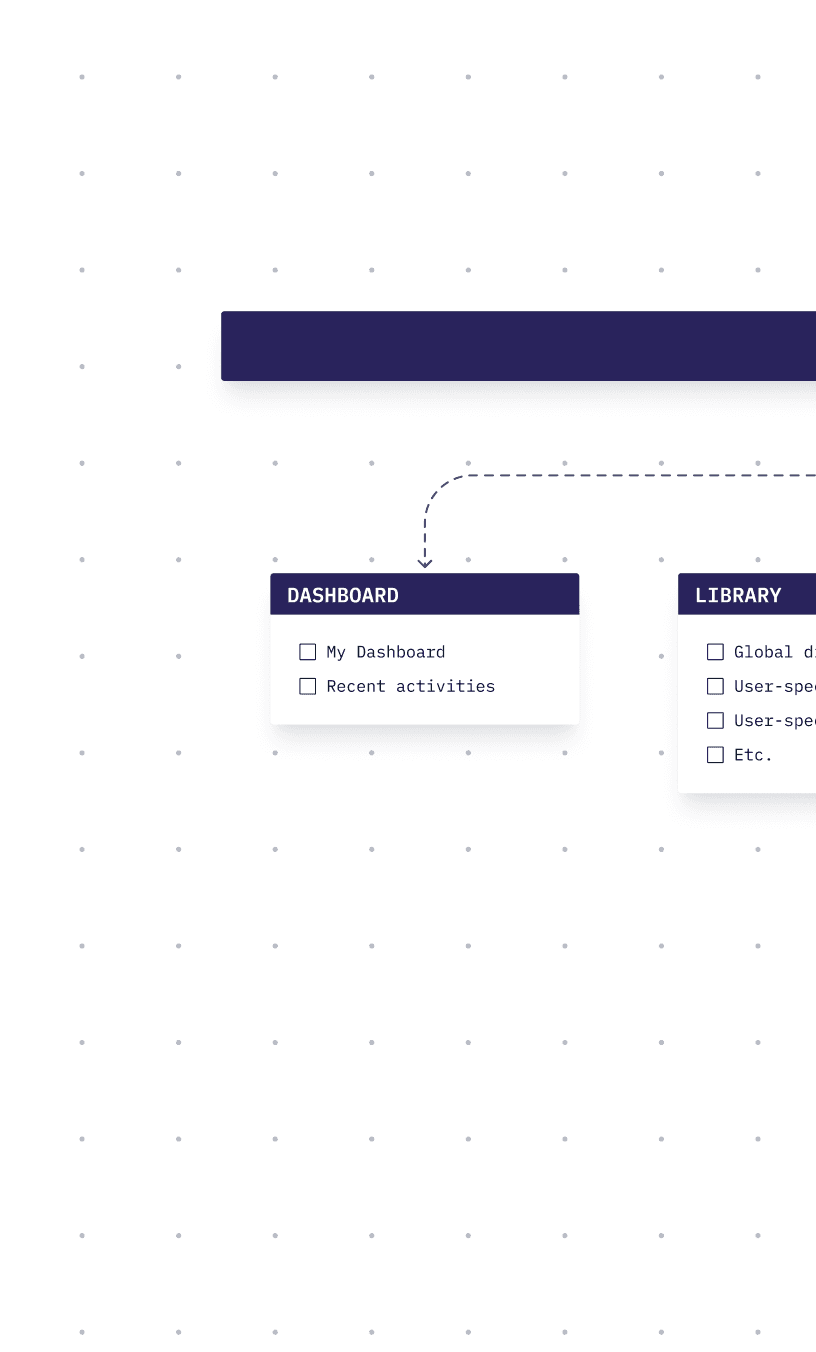
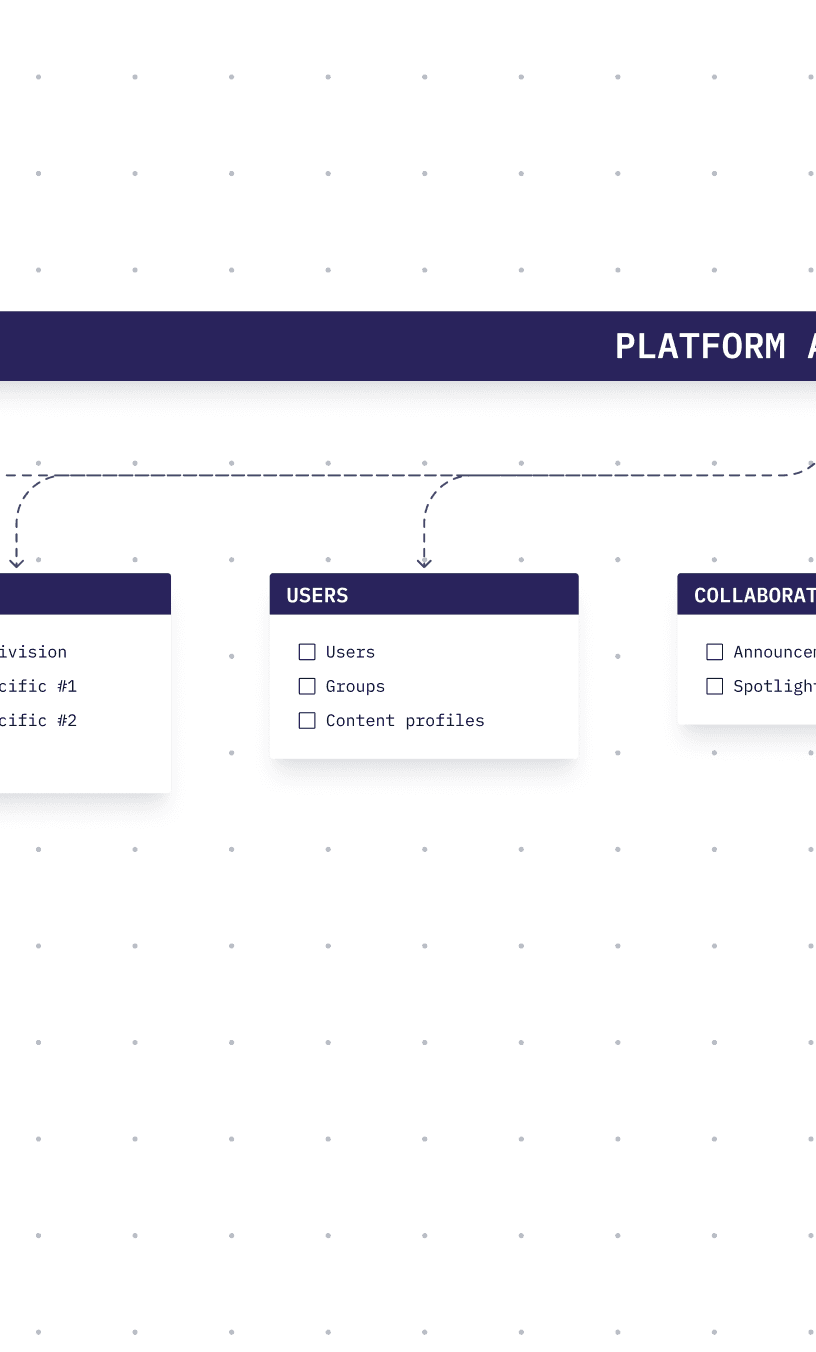
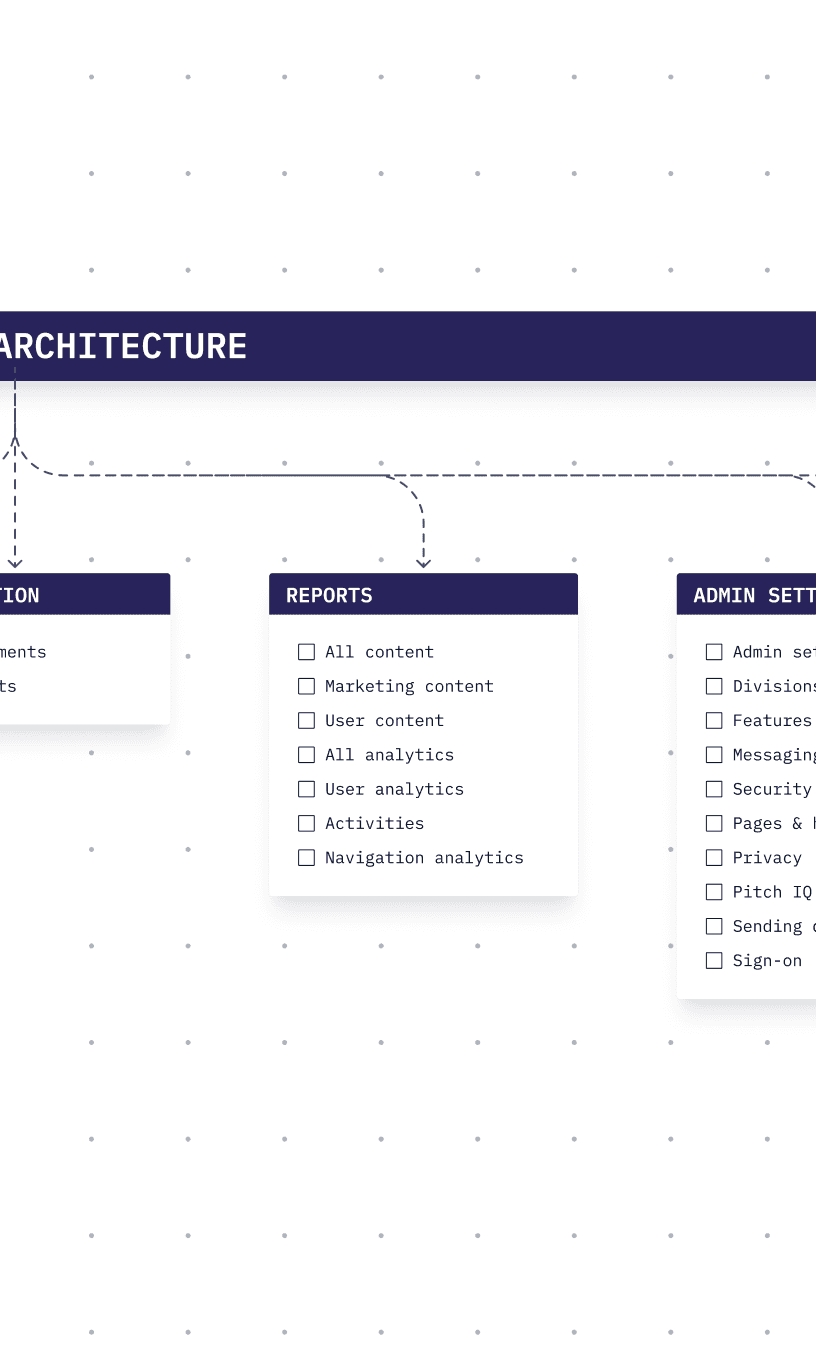
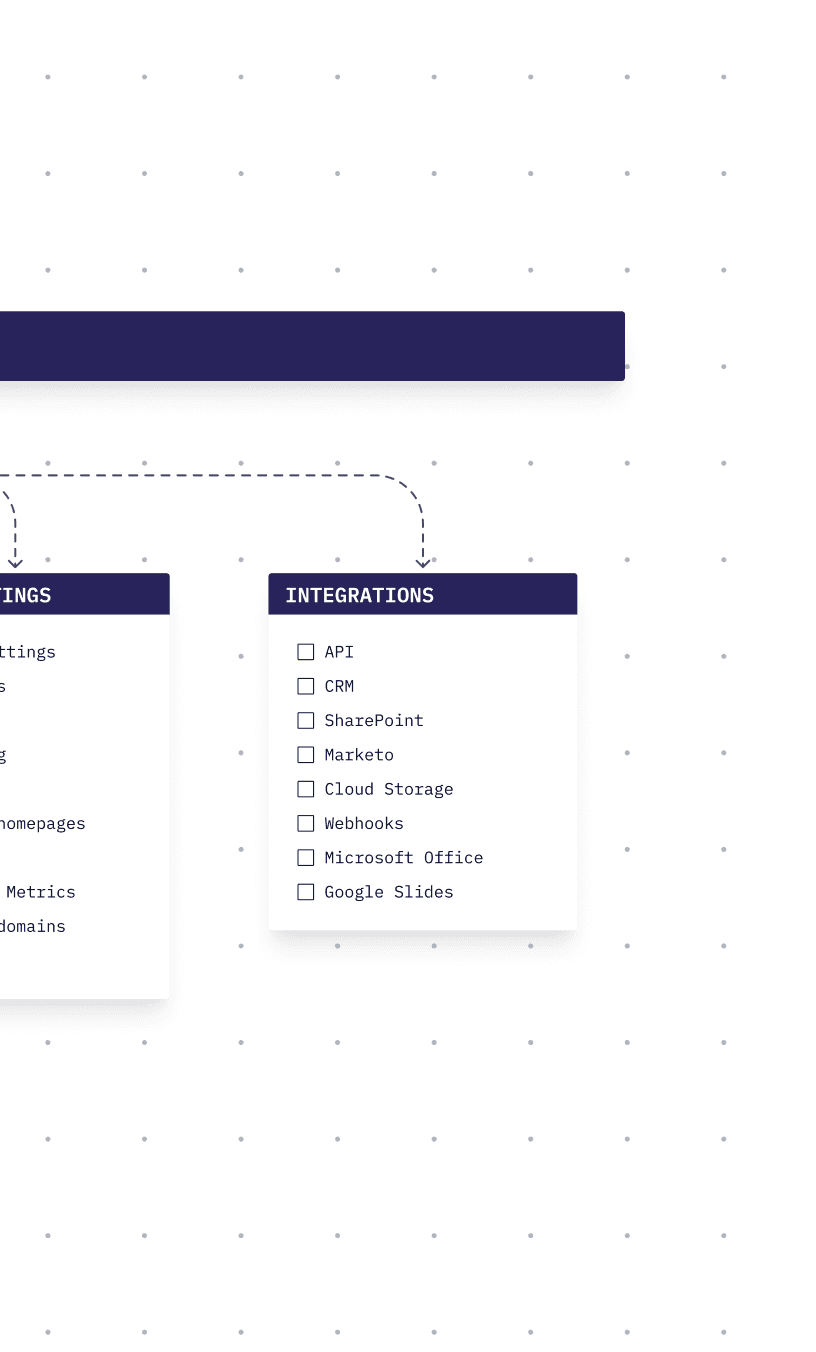
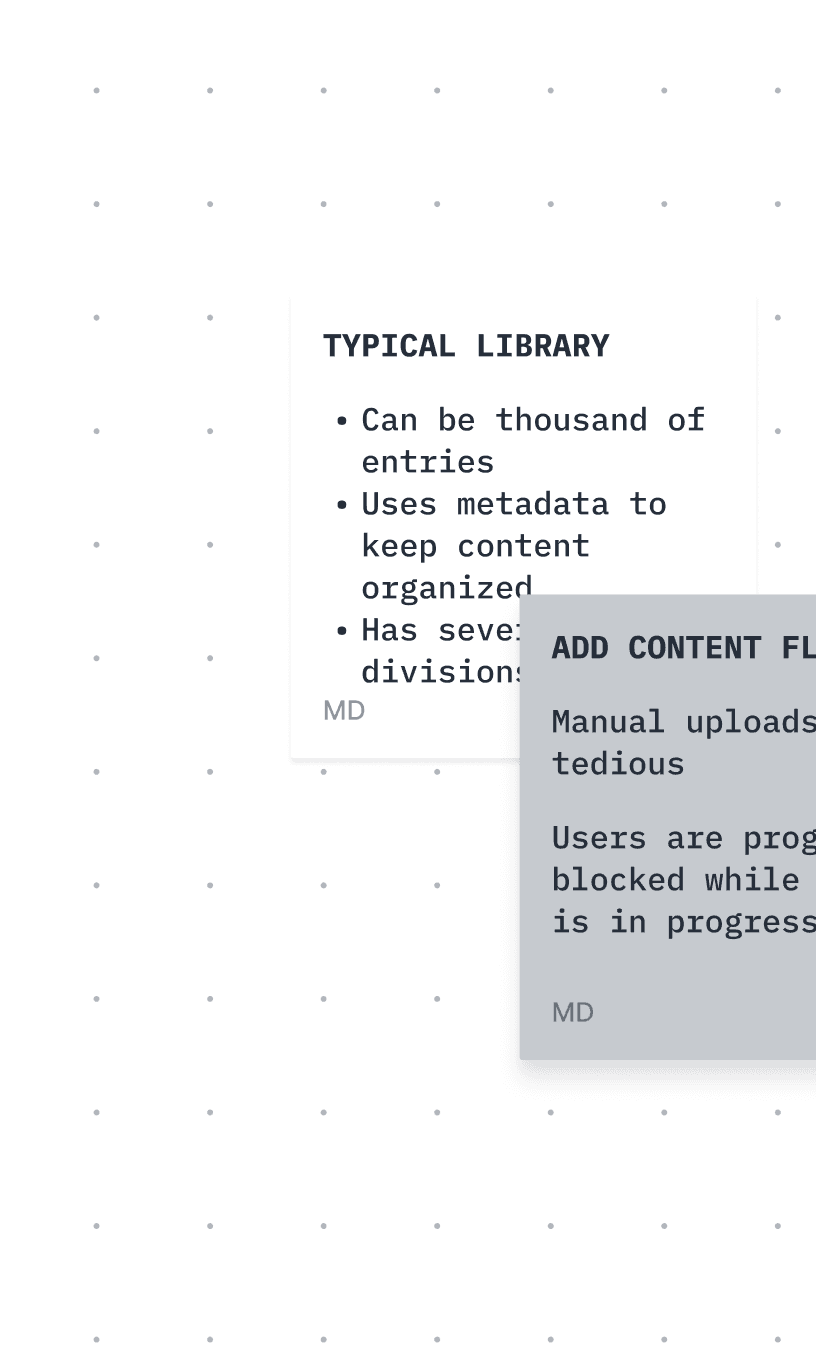
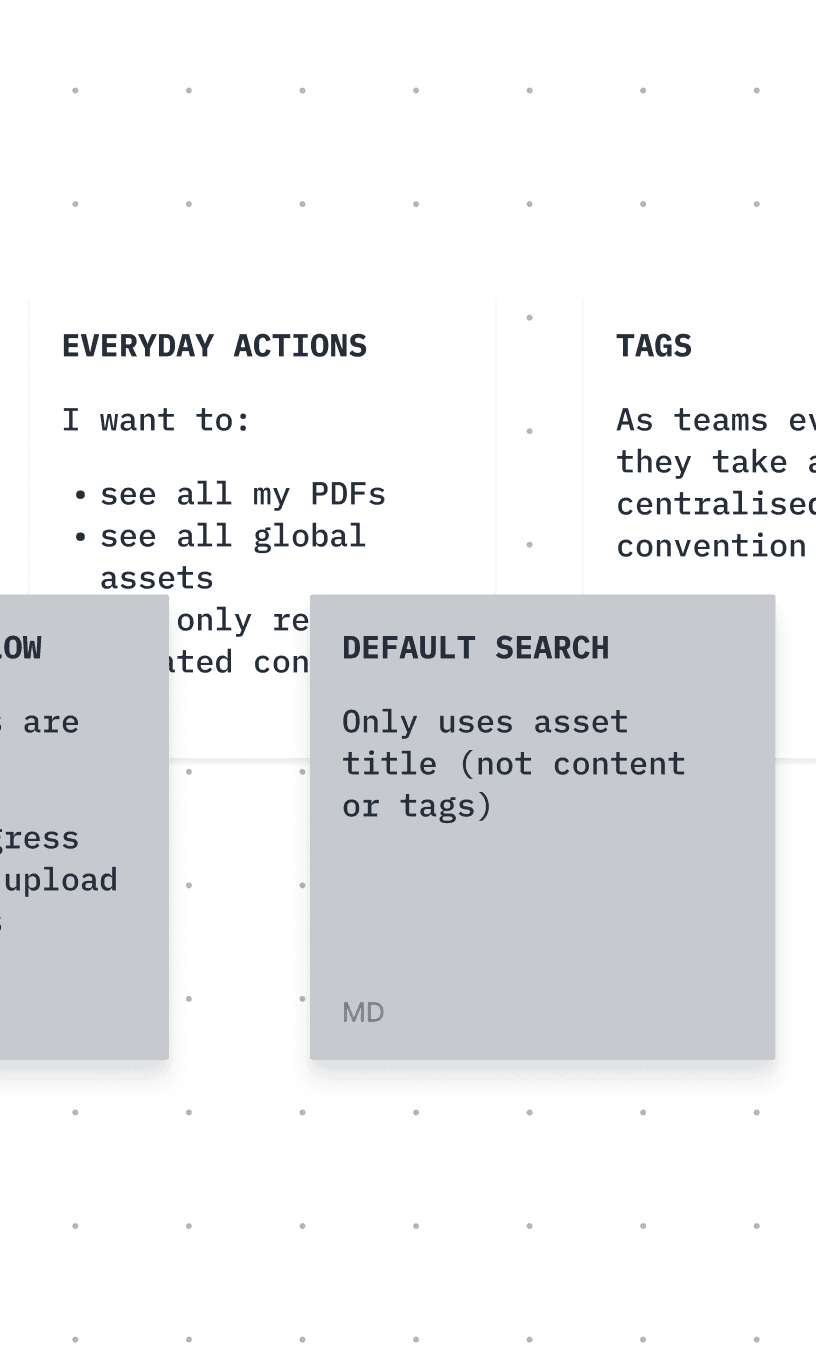
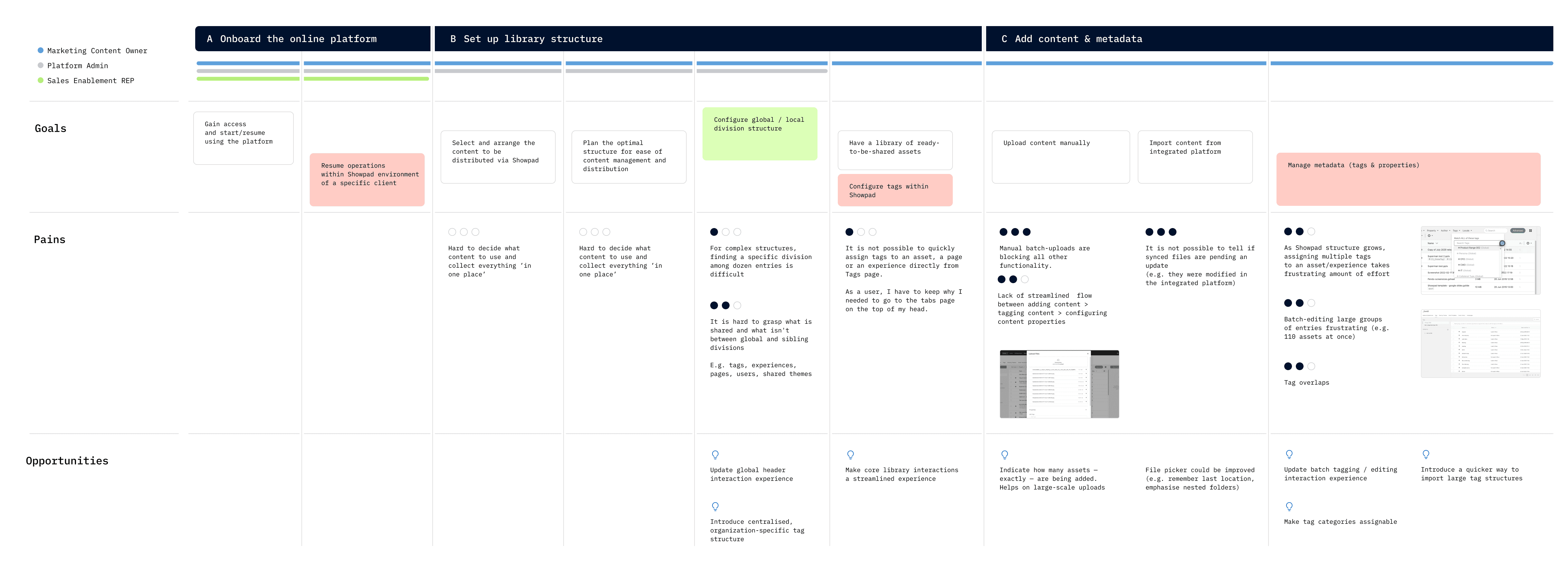
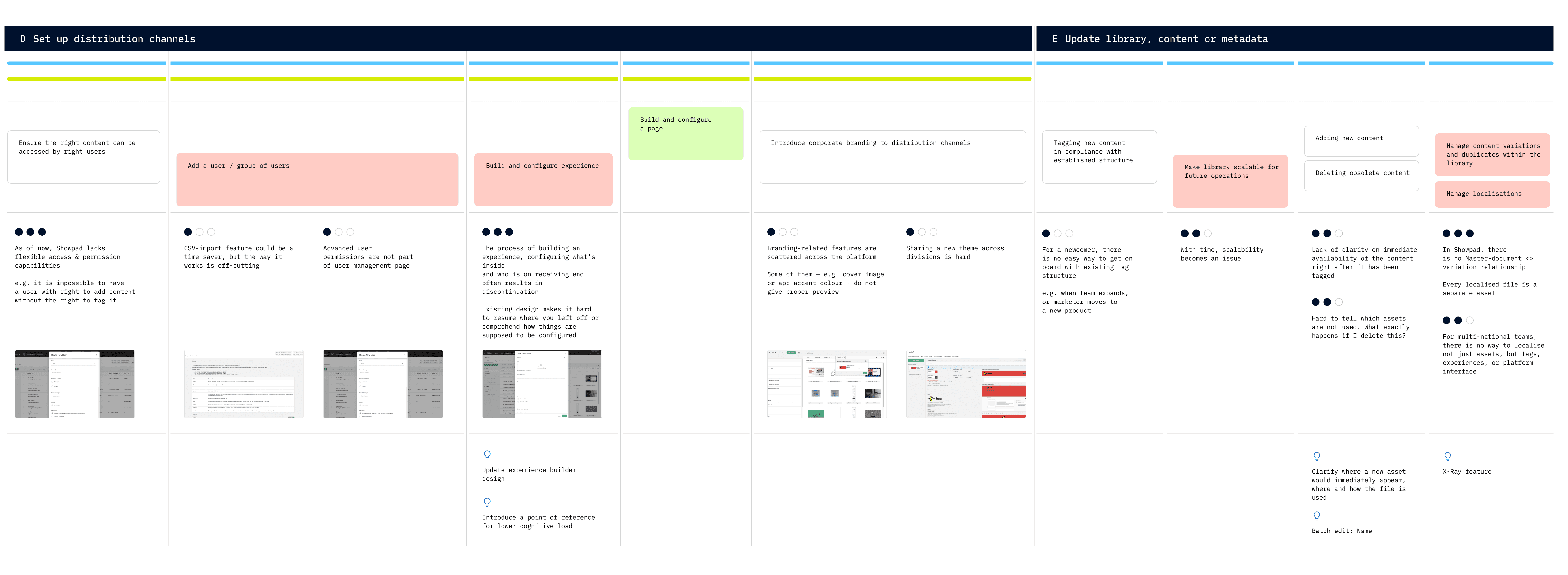
As Design Lead, I carried multiple responsibilities. I first needed to establish the right UX methodology — one that would allow me to onboard my team quickly and give everyone a clear understanding of the project’s background, constraints, and roadmap. At the outset, our team consisted of myself, a Creative Director and a junior UI/UX designer, and later expanded to include two dedicated researchers as the scope deepened.
As Design Lead, I carried multiple responsibilities. I first needed to establish the right UX methodology — one that would allow me to onboard my team quickly and give everyone a clear understanding of the project’s background, constraints, and roadmap. At the outset, our team consisted of myself, a Creative Director and a junior UI/UX designer, and later expanded to include two dedicated researchers as the scope deepened.

1 of 3




1 of 3
1 of 3
1 of 3
1 of 3
1 of 3
At the same time, I was trying to establish an open and engaging communication with the client's stakeholders, customer support managers, the in-house design team, researchers, and anyone necessary to keep momentum high and avoid unfeasible design solutions.
At the same time, I was trying to establish an open and engaging communication with the client's stakeholders, customer support managers, the in-house design team, researchers, and anyone necessary to keep momentum high and avoid unfeasible design solutions.
Luckily for me, Showpad’s friendly and collaborative culture gave our team a strong start. We were able to define our priorities, find common ground on the project scope, expected deliverables and timeline.
Luckily for me, Showpad’s friendly and collaborative culture gave our team a strong start. We were able to define our priorities, find common ground on the project scope, expected deliverables and timeline.
THE CHALLENGE
THE CHALLENGE
THE CHALLENGE
THINKING BIG, TESTING SMALL
THINKING BIG, TESTING SMALL
THINKING BIG, TESTING SMALL
The OP side of Showpad’s enablement platform hadn’t received significant design attention in years. It had grown dense, fragmented, and difficult to use. Our plan was to split our efforts in two directions.
The OP side of Showpad’s enablement platform hadn’t received significant design attention in years. It had grown dense, fragmented, and difficult to use. Our plan was to split our efforts in two directions.
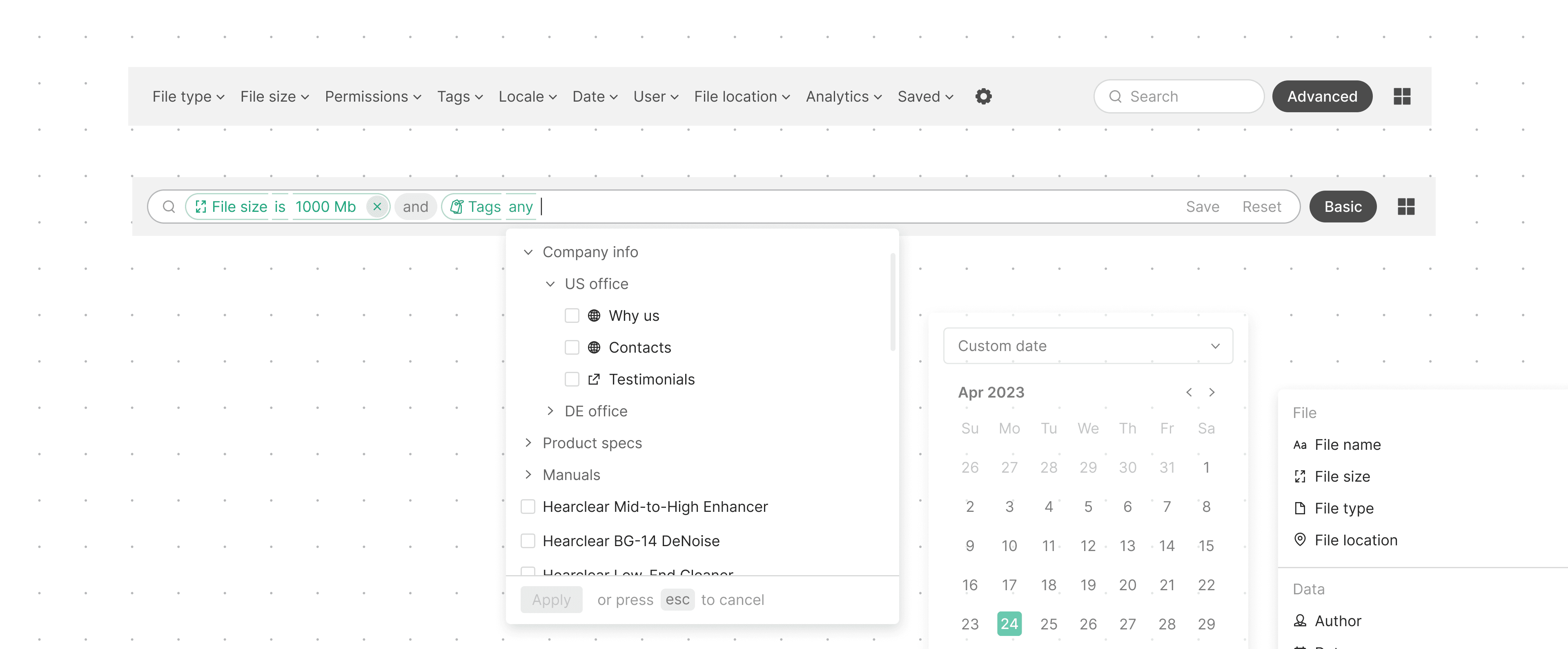
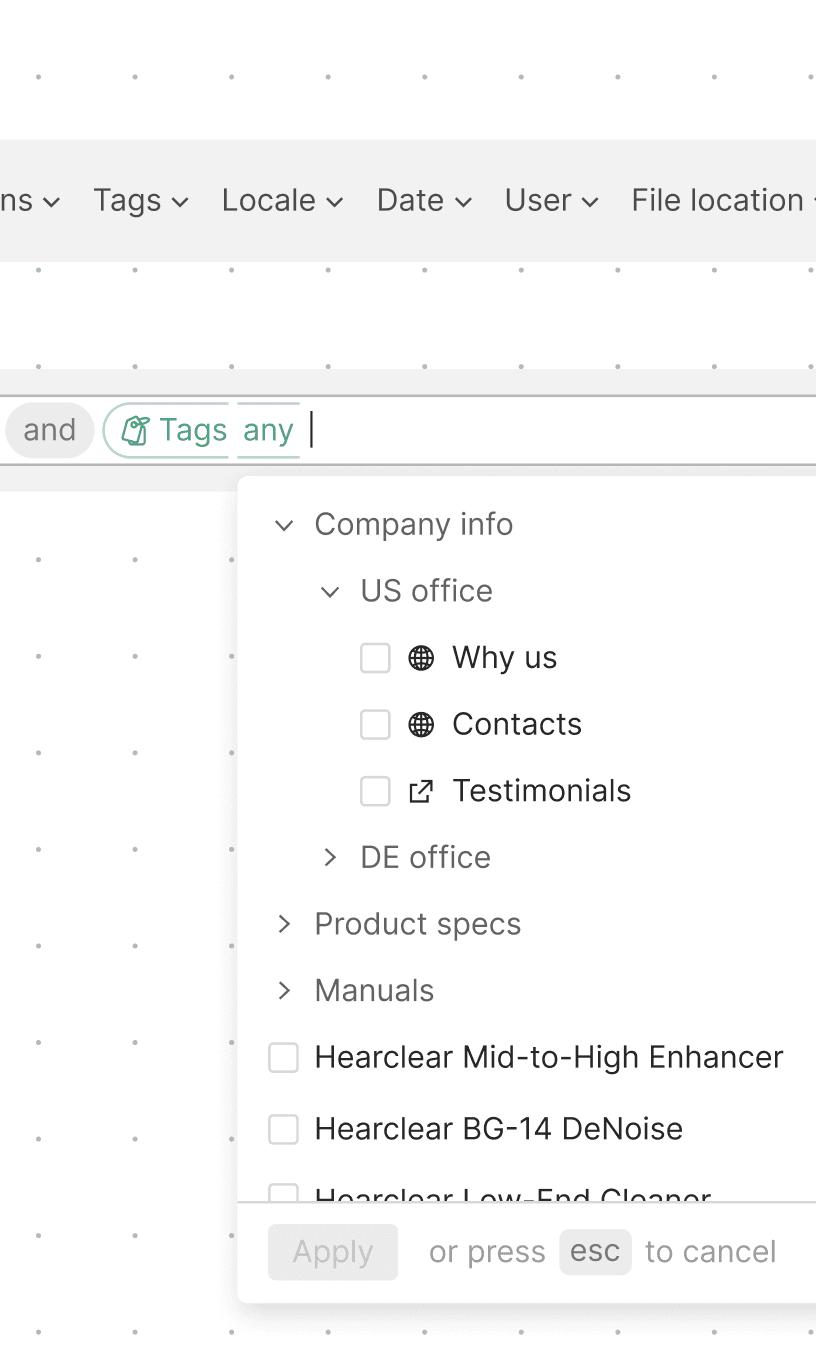
First, we focused on quick, high-impact usability fixes that could immediately improve most frequent tasks. A deep, hands-on UX audit allowed me to pinpoint those. Our first priority was to:
First, we focused on quick, high-impact usability fixes that could immediately improve most frequent tasks. A deep, hands-on UX audit allowed me to pinpoint those. Our first priority was to:
1️⃣ Simplify searching and filtering experience;
1️⃣ Simplify searching and filtering experience;
2️⃣ Remove progress blockers discovered within uploading and onboarding flows;
2️⃣ Remove progress blockers discovered within uploading and onboarding flows;
3️⃣ Accelerate tagging the content within constraints of existing design.
3️⃣ Accelerate tagging the content within constraints of existing design.
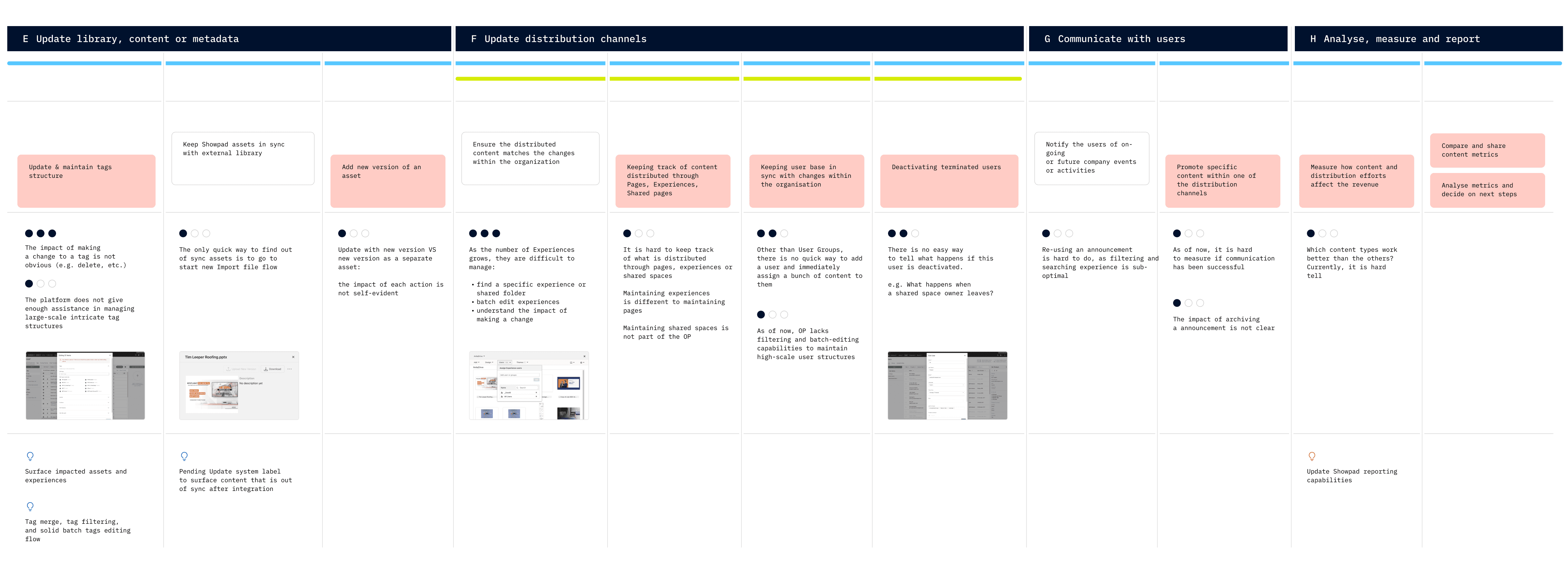
In parallel, we began exploring North Star concepts for the platform’s longer-term evolution.This included ideas like automated metadata operations, AI-assisted duplicate management, multilingual content management, simplified navigation, etc.
In parallel, we began exploring North Star concepts for the platform’s longer-term evolution.This included ideas like automated metadata operations, AI-assisted duplicate management, multilingual content management, simplified navigation, etc.
Our intention was to bring most promising designs to the focus test scheduled for final month of this project.
Our intention was to bring most promising designs to the focus test scheduled for final month of this project.
SHORT TERM SOLUTIONS
SHORT TERM SOLUTIONS
SHORT TERM SOLUTIONS
REDUCE, SIMPLIFY, ACCELERATE
REDUCE, SIMPLIFY, ACCELERATE
REDUCE, SIMPLIFY, ACCELERATE
At first, we focused on automating tedious, repetitive tasks using the existing visual language, while intentionally designing new components and patterns so they could be seamlessly transferred to our long-term vision.
At first, we focused on automating tedious, repetitive tasks using the existing visual language, while intentionally designing new components and patterns so they could be seamlessly transferred to our long-term vision.
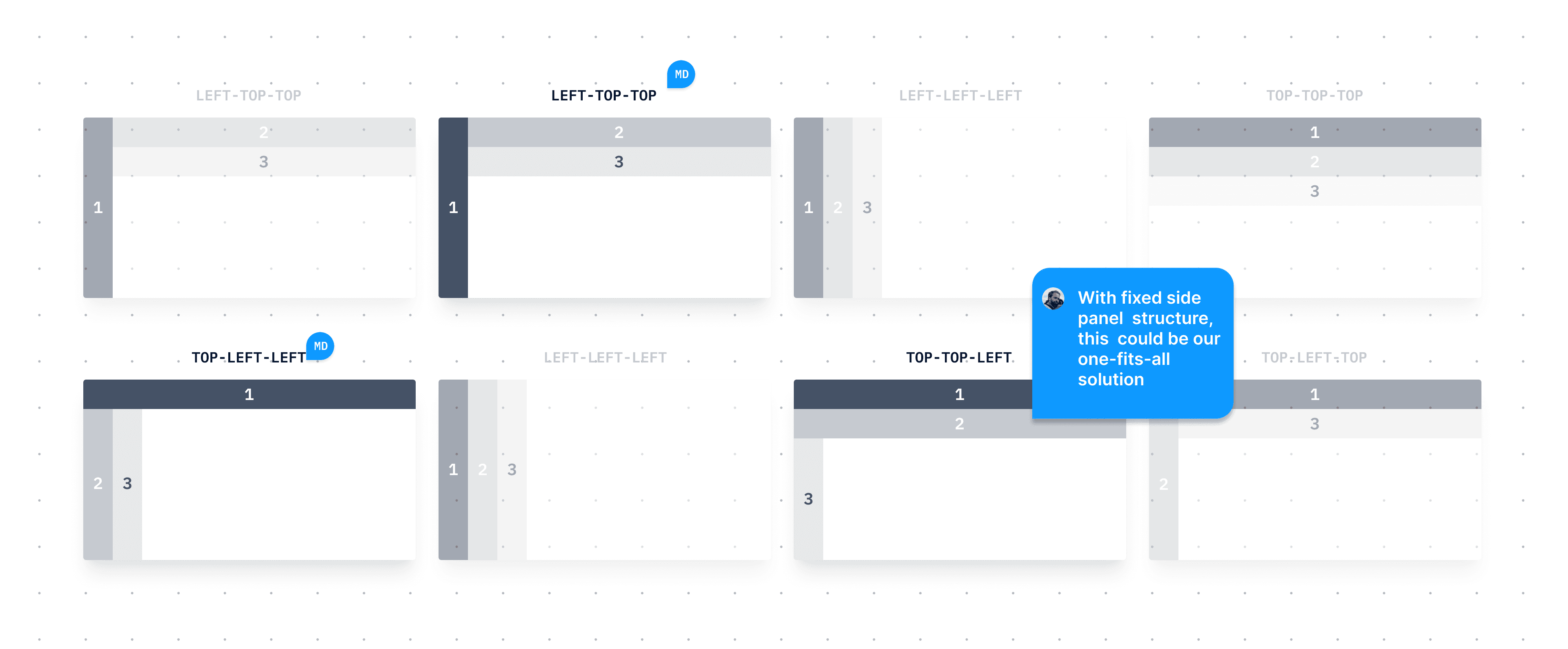
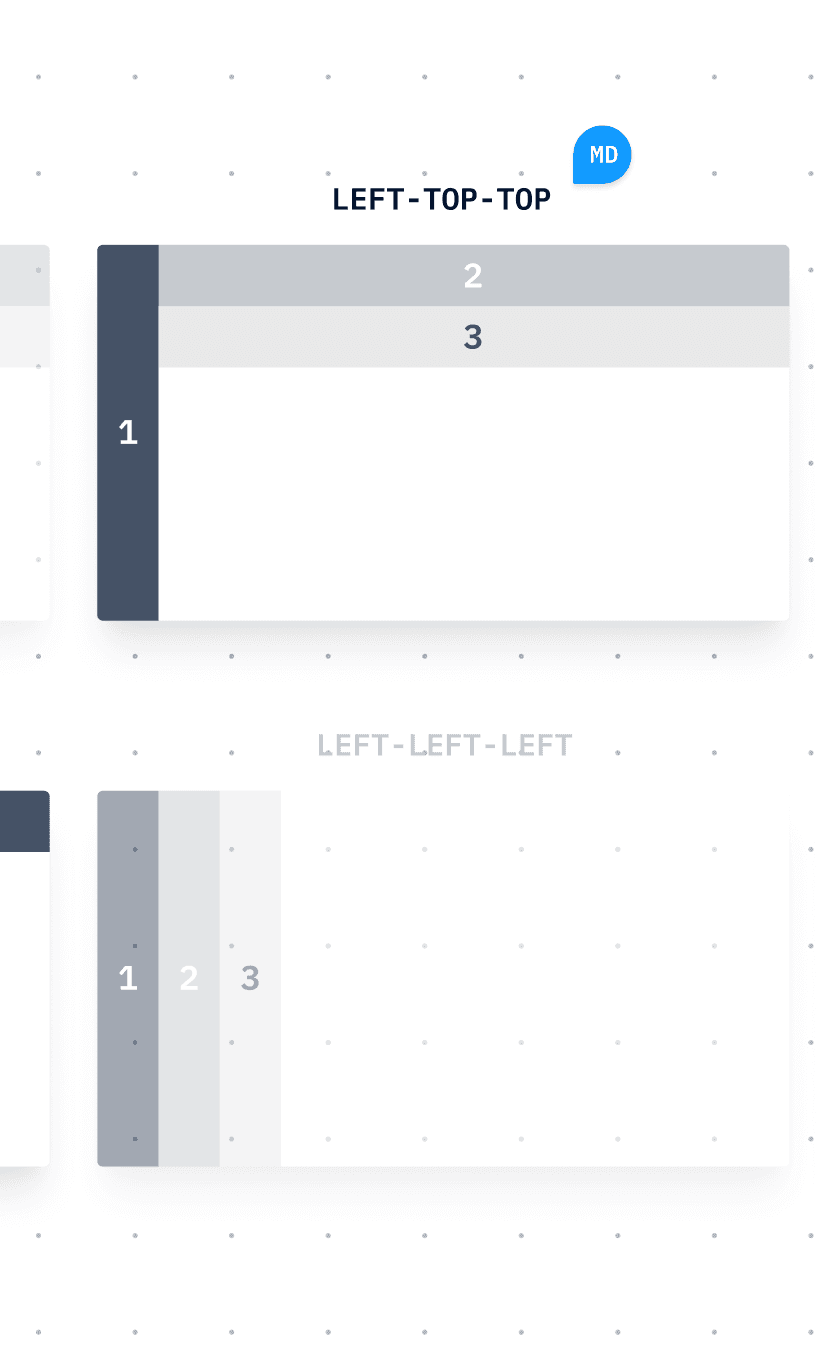
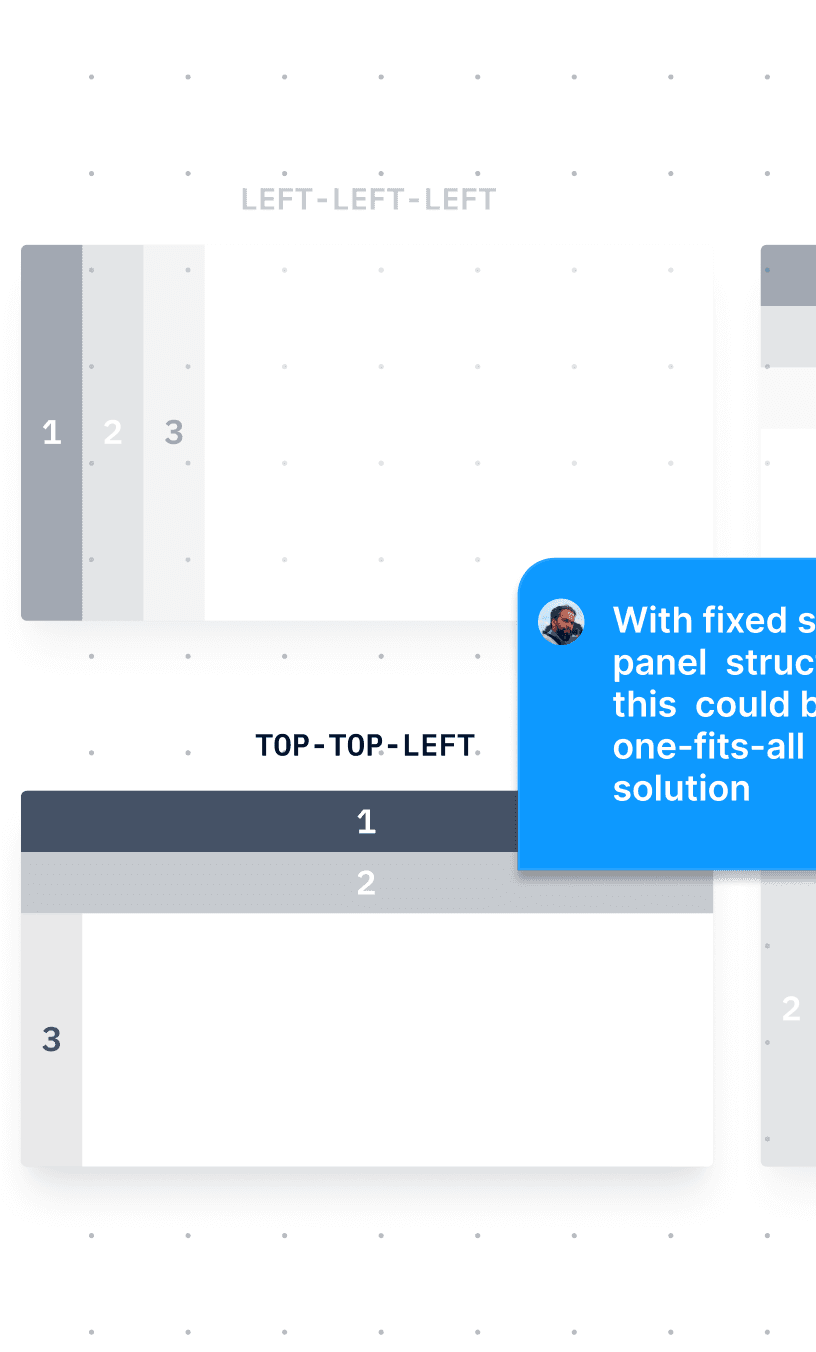
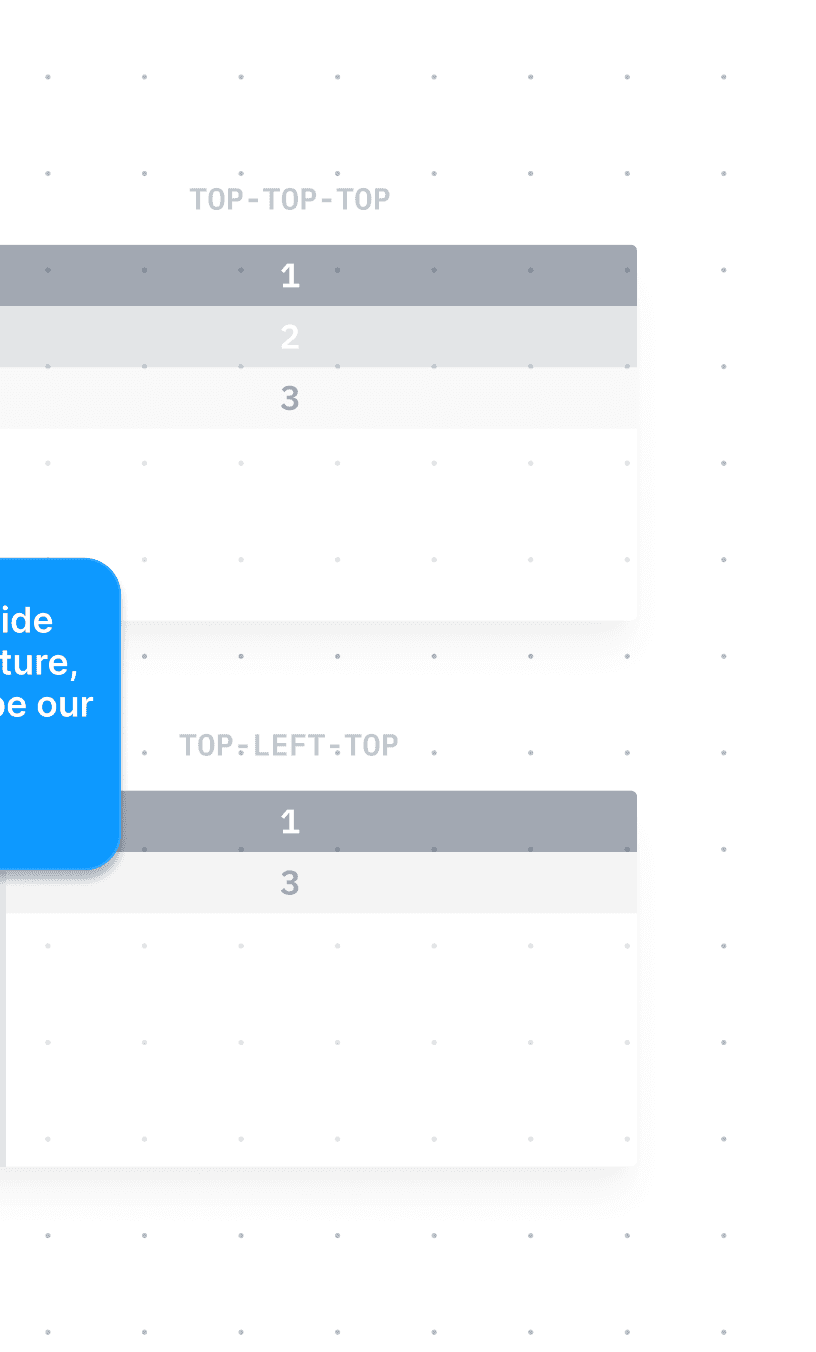
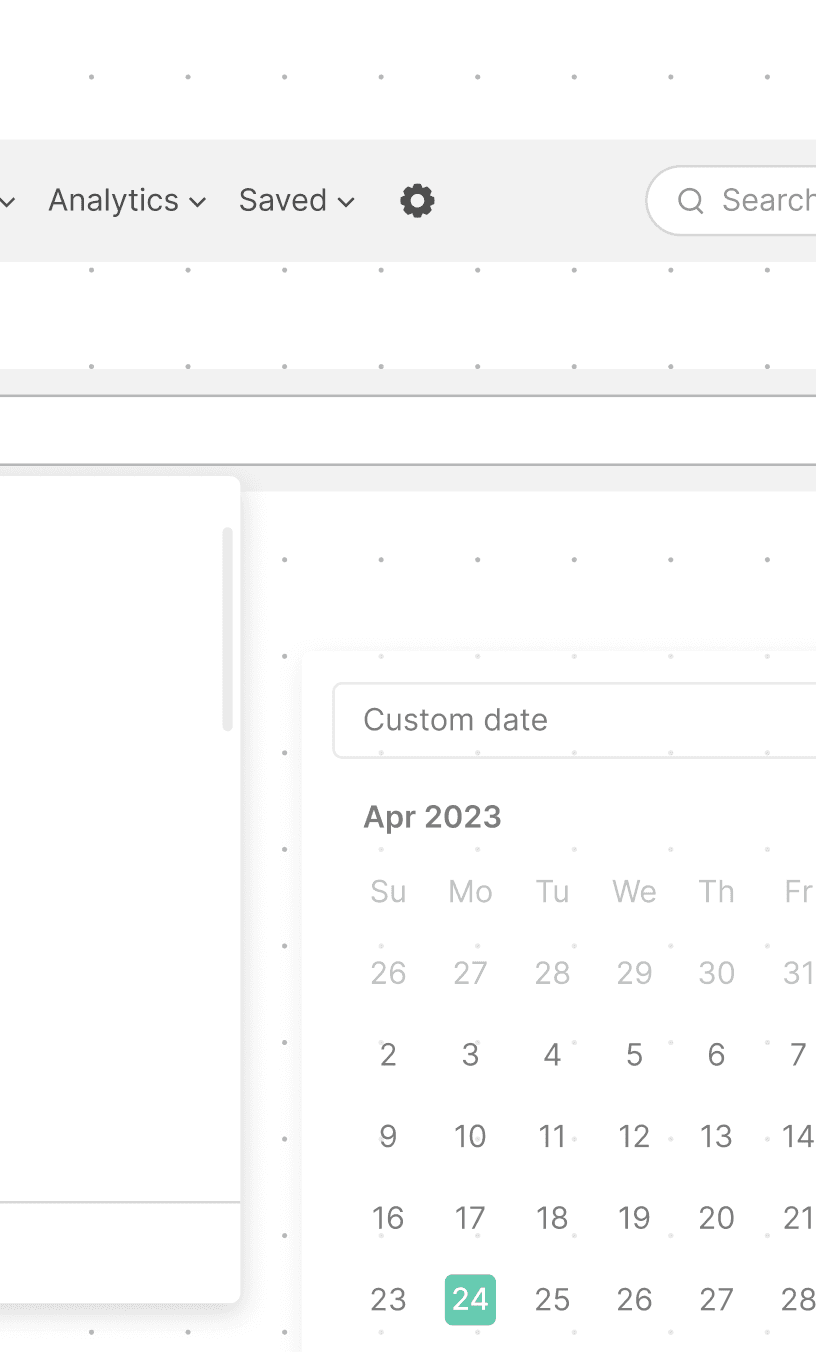
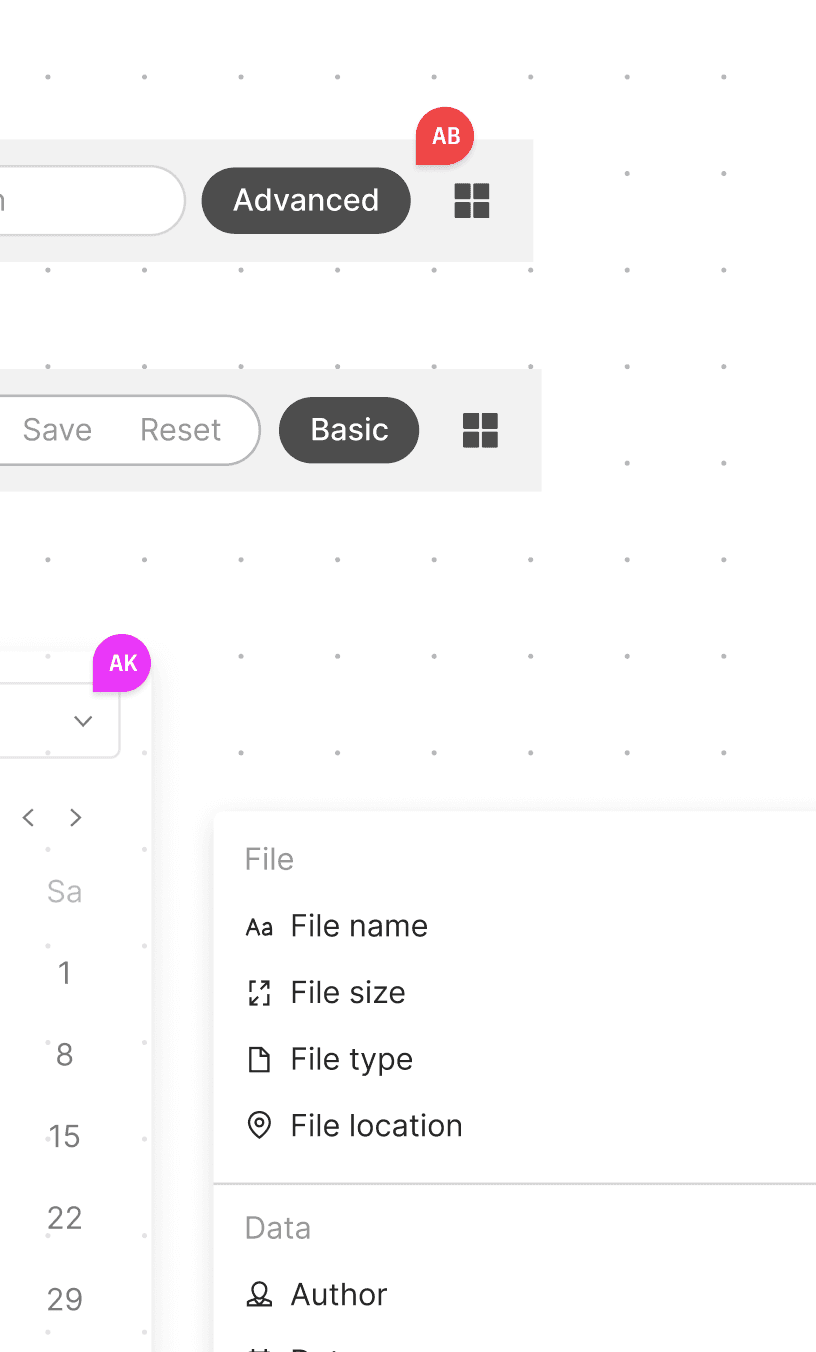
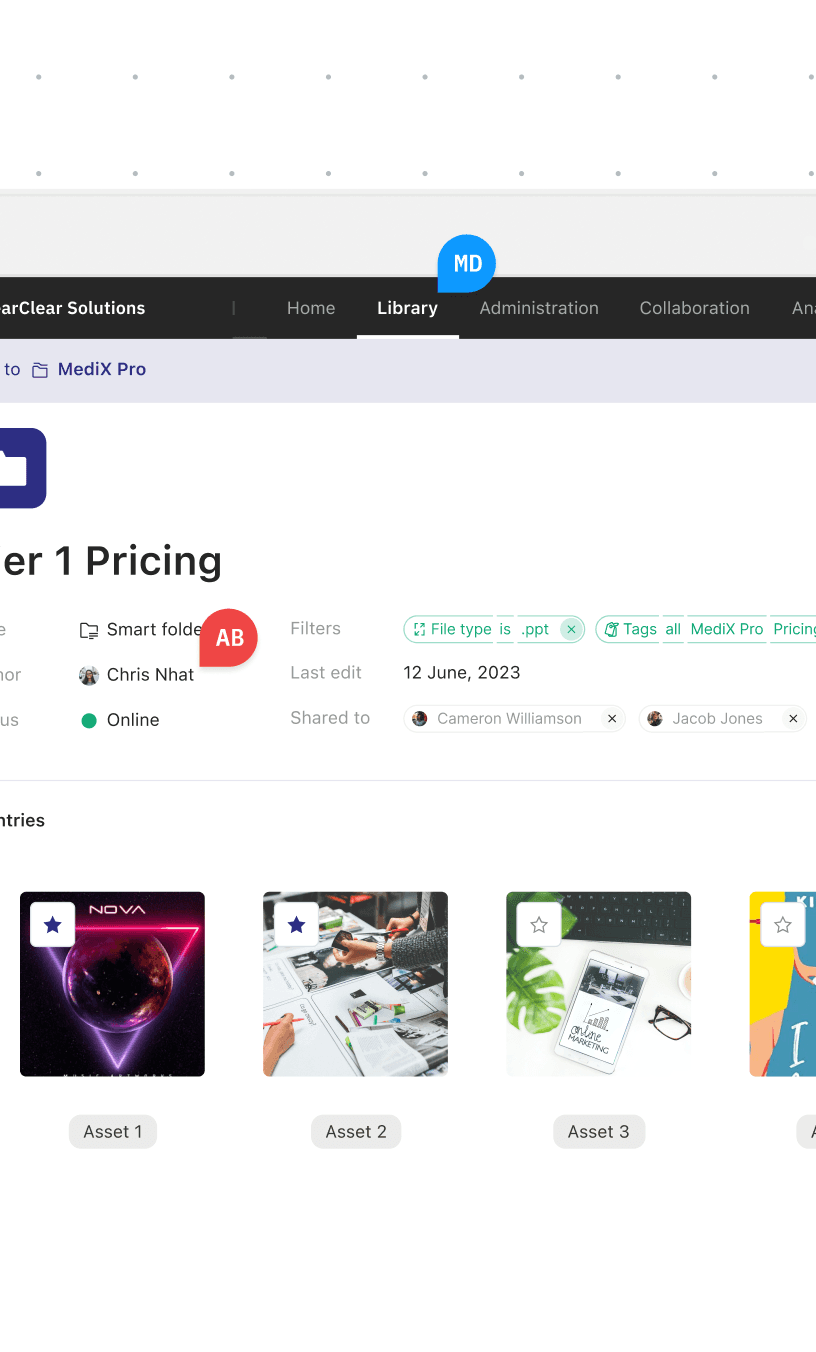
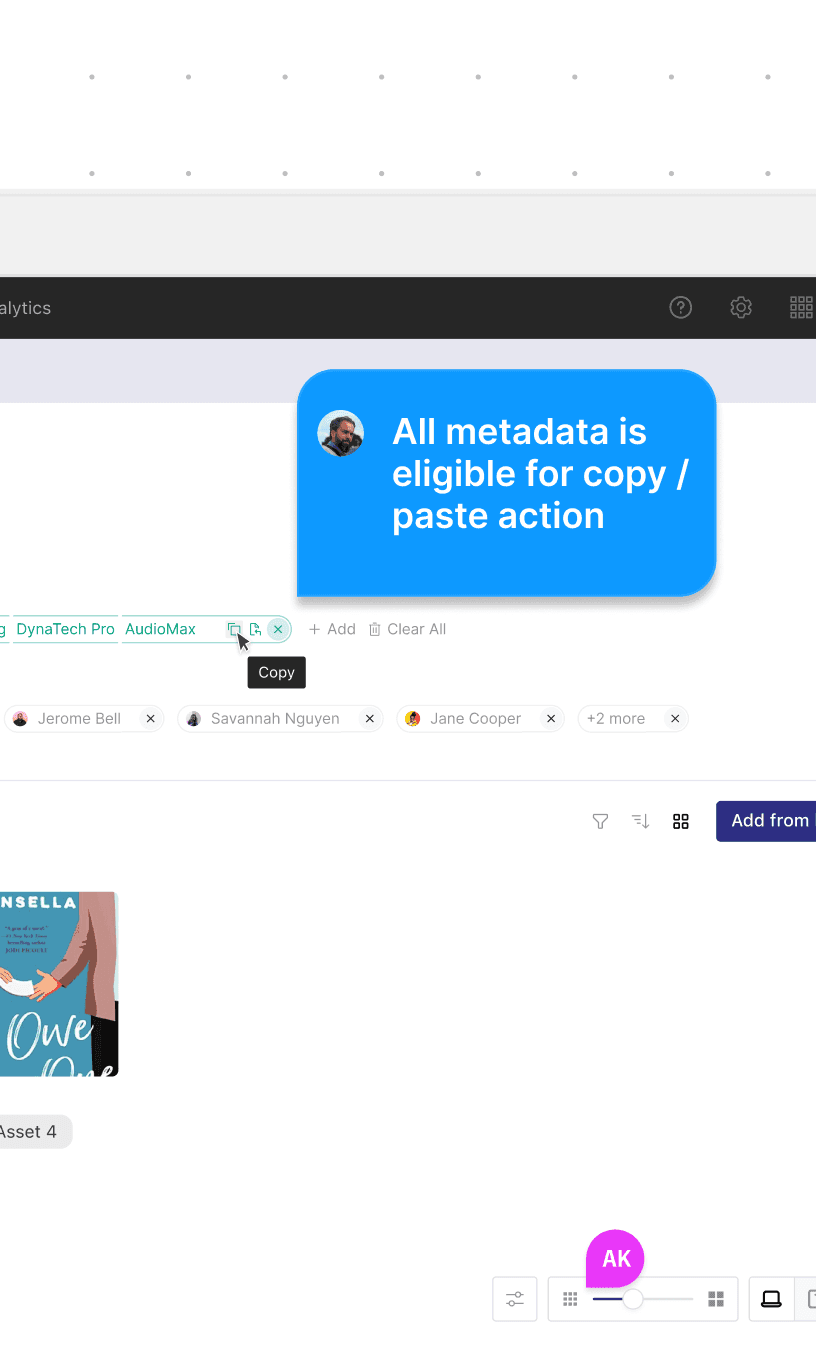
We began by unifying navigation pattern and removing inconsistencies in structure and behavior to:
surface most critical parts of the platform;
make navigation predictable;
remove cognitive overlaps between similar modules;
create a flexible framework for future features.

1 of 3
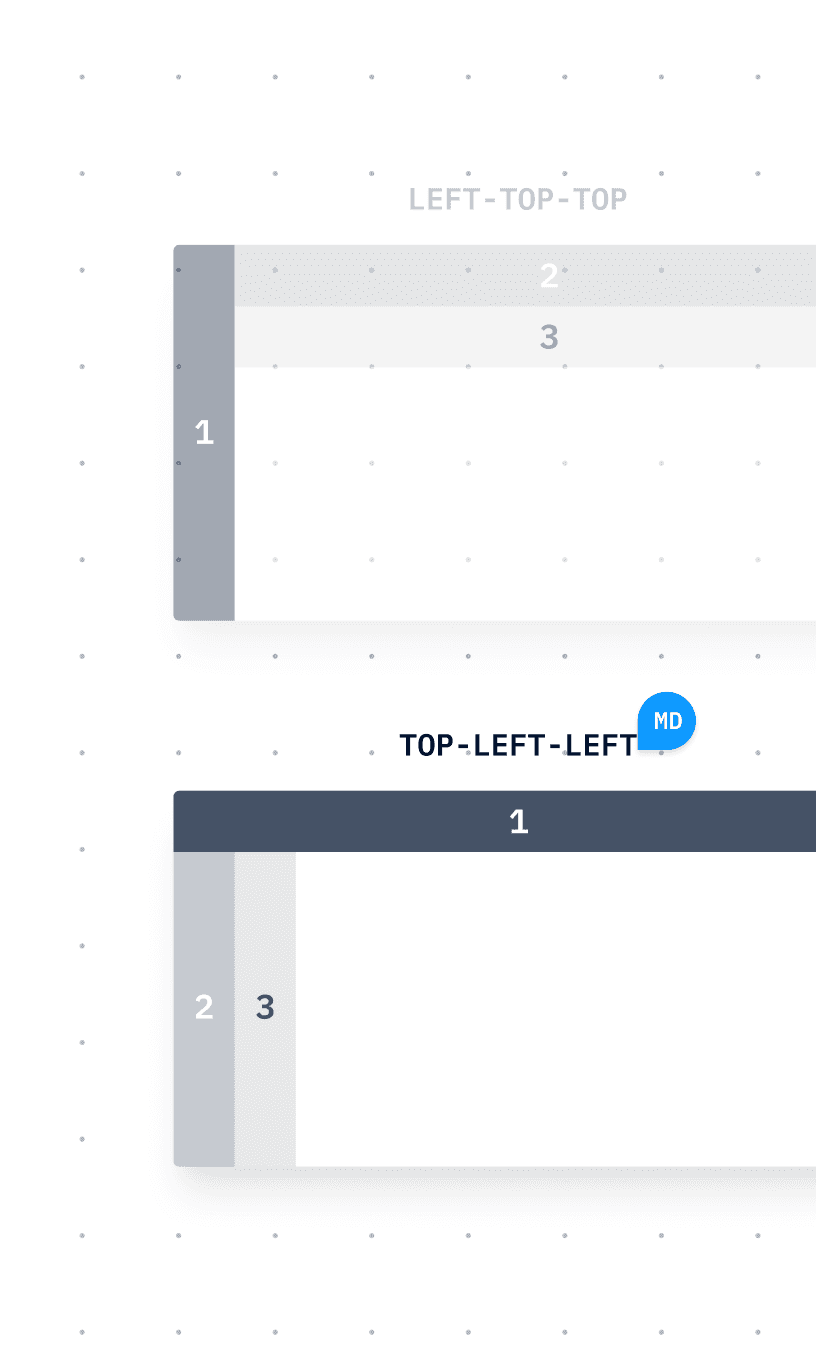
We began by unifying navigation pattern and removing inconsistencies in structure and behavior to:
surface most critical parts of the platform;
make navigation predictable;
remove cognitive overlaps between similar modules;
create a flexible framework for future features.



1 of 3
We began by unifying navigation pattern and removing inconsistencies in structure and behavior to:
surface most critical parts of the platform;
make navigation predictable;
remove cognitive overlaps between similar modules;
create a flexible framework for future features.
1 of 3
We began by unifying navigation pattern and removing inconsistencies in structure and behavior to:
surface most critical parts of the platform;
make navigation predictable;
remove cognitive overlaps between similar modules;
create a flexible framework for future features.
1 of 3
We began by unifying navigation pattern and removing inconsistencies in structure and behavior to:
surface most critical parts of the platform;
make navigation predictable;
remove cognitive overlaps between similar modules;
create a flexible framework for future features.
1 of 3
We began by unifying navigation pattern and removing inconsistencies in structure and behavior to:
surface most critical parts of the platform;
make navigation predictable;
remove cognitive overlaps between similar modules;
create a flexible framework for future features.
1 of 3
USER RESEARCH
USER RESEARCH
USER RESEARCH
FROM ASSUMPTIONS TO EVIDENCE
FROM ASSUMPTIONS TO EVIDENCE
FROM ASSUMPTIONS TO EVIDENCE
With support from the in-house research team, we recruited nine current Showpad users with different roles and levels of experience. Each participated in a one-hour session structured around the prototype we had prepared.
With support from the in-house research team, we recruited nine current Showpad users with different roles and levels of experience. Each participated in a one-hour session structured around the prototype we had prepared.
The prototype simulated a realistic working environment and asked participants to complete four tasks. These tasks covered key parts of the updated experience, including the side panel, main viewer, object viewer, upload flow, and batch operations.
The prototype simulated a realistic working environment and asked participants to complete four tasks. These tasks covered key parts of the updated experience, including the side panel, main viewer, object viewer, upload flow, and batch operations.
This setup allowed us to observe how users interacted with the redesigned elements in context and see where the new patterns supported or challenged their workflows. These observations gave us qualitative insight into real user behaviour and helped clarify which parts of the experience required further refinement.
This setup allowed us to observe how users interacted with the redesigned elements in context and see where the new patterns supported or challenged their workflows. These observations gave us qualitative insight into real user behaviour and helped clarify which parts of the experience required further refinement.
To protect participants' privacy, the video above is actual screen capture of one of the sessions featuring researcher annotations only. Participant camera and audio input have been removed.
To protect participants' privacy, the video above is actual screen capture of one of the sessions featuring researcher annotations only. Participant camera and audio input have been removed.
To protect participants' privacy, the video above is actual screen capture of one of the sessions featuring researcher annotations only. Participant camera and audio input have been removed.
To protect participants' privacy, the video above is actual screen capture of one of the sessions featuring researcher annotations only. Participant camera and audio output have been removed.
THE IMPACT
THE IMPACT
THE IMPACT
THAT WAS INFORMATIVE… SO WHAT DO WE DO NEXT?
THAT WAS INFORMATIVE… SO WHAT DO WE DO NEXT?
THAT WAS INFORMATIVE… SO WHAT DO WE DO NEXT?
One thing I learned during my time with littlevoice is that neither large nor small companies place their trust in design heuristics or fancy metrics alone — they trust their users.
One thing I learned during my time with littlevoice is that neither large nor small companies place their trust in design heuristics or fancy metrics alone — they trust their users.
Research validated immediate improvements and provided context for the long-term direction. It aligned Showpad stakeholders around a clear path forward for the platform.
Research validated immediate improvements and provided context for the long-term direction. It aligned Showpad stakeholders around a clear path forward for the platform.
GENERAL FINDINGS
GENERAL FINDINGS
GENERAL FINDINGS
Our sessions showed that the new structure and flow successfully addressed several long-standing issues in the current experience. Participants with different levels of expertise had developed strong habits, and some initially worried about losing familiar interaction patterns.
Our sessions showed that the new structure and flow successfully addressed several long-standing issues in the current experience. Participants with different levels of expertise had developed strong habits, and some initially worried about losing familiar interaction patterns.
However, overall sentiment toward the redesign was far more positive than expected. Most users saw the changes as a step in the right direction, noting that a gradual introduction would make the transition smoother.
However, overall sentiment toward the redesign was far more positive than expected. Most users saw the changes as a step in the right direction, noting that a gradual introduction would make the transition smoother.

[...] the copy and paste feature of tags is amazing. It takes a lot of extra steps out of the way where if I need to add the same tags to it, an additional piece, either I have to select both of the pieces and go add and add the tag to each one. Or I need to go into the asset that doesn't have tags and manually search again for those tags.

I definitely see the value that it brings, being able to copy and paste those assets to make sure that we've captured the right assets with the other assets will save a considerable amount of time. So we're talking about my biggest issue that I've had with Showpad since I started with the platform.

I think it just needs a little bit getting used to. For new customers, I think it's a no-brainer, for the old guys like me that are used to, to the how it worked before probably will need some getting used to.

I absolutely love it. I think you guys did a fantastic job. And not only for my aspect, but others uploading content. I think sometimes it's a daunting task, especially with how many tags we have and how many different experiences that we have. And it just becomes a little scary for newer associates or someone that's not as familiar in Showpad.

I think it's pretty cool. I didn't know tags was under usage at first and now that I see it's there, I would know it's there but it wasn't, it wasn't obvious it was under usage. But I really like being able to just copy and paste tags like that because right now we're doing like select all and edit multiple assets at the same time.

It's quite intuitive in the sense that we have our assets and everything down the left hand side. I'd probably going far as see that it's probably easier with that because it's all in one location. So I quite like that. I think that's quite good.

It seems a lot more streamlined. There's a lot less information here and I think the previews are quite nice. It always helps a little bit to be able to actually see the content cuz you get that double recognition, you recognize the file name and sometimes you recognize the content by the image.

It's nice you have a preview tile, otherwise it's just text lines previously and you don't actually see what it is until you click into it to pull up the little editor I guess on the right. So this is really handy.
[...] the copy and paste feature of tags is amazing. It takes a lot of extra steps out of the way where if I need to add the same tags to it, an additional piece, either I have to select both of the pieces and go add and add the tag to each one. Or I need to go into the asset that doesn't have tags and manually search again for those tags.
I definitely see the value that it brings, being able to copy and paste those assets to make sure that we've captured the right assets with the other assets will save a considerable amount of time. So we're talking about my biggest issue that I've had with Showpad since I started with the platform.
I think it just needs a little bit getting used to. For new customers, I think it's a no-brainer, for the old guys like me that are used to, to the how it worked before probably will need some getting used to.
I absolutely love it. I think you guys did a fantastic job. And not only for my aspect, but others uploading content. I think sometimes it's a daunting task, especially with how many tags we have and how many different experiences that we have. And it just becomes a little scary for newer associates or someone that's not as familiar in Showpad.
I think it's pretty cool. I didn't know tags was under usage at first and now that I see it's there, I would know it's there but it wasn't, it wasn't obvious it was under usage. But I really like being able to just copy and paste tags like that because right now we're doing like select all and edit multiple assets at the same time.
It's quite intuitive in the sense that we have our assets and everything down the left hand side. I'd probably going far as see that it's probably easier with that because it's all in one location. So I quite like that. I think that's quite good.
It seems a lot more streamlined. There's a lot less information here and I think the previews are quite nice. It always helps a little bit to be able to actually see the content cuz you get that double recognition, you recognize the file name and sometimes you recognize the content by the image.
It's nice you have a preview tile, otherwise it's just text lines previously and you don't actually see what it is until you click into it to pull up the little editor I guess on the right. So this is really handy.
[...] the copy and paste feature of tags is amazing. It takes a lot of extra steps out of the way where if I need to add the same tags to it, an additional piece, either I have to select both of the pieces and go add and add the tag to each one. Or I need to go into the asset that doesn't have tags and manually search again for those tags.
I definitely see the value that it brings, being able to copy and paste those assets to make sure that we've captured the right assets with the other assets will save a considerable amount of time. So we're talking about my biggest issue that I've had with Showpad since I started with the platform.
I think it just needs a little bit getting used to. For new customers, I think it's a no-brainer, for the old guys like me that are used to, to the how it worked before probably will need some getting used to.
I absolutely love it. I think you guys did a fantastic job. And not only for my aspect, but others uploading content. I think sometimes it's a daunting task, especially with how many tags we have and how many different experiences that we have. And it just becomes a little scary for newer associates or someone that's not as familiar in Showpad.
I think it's pretty cool. I didn't know tags was under usage at first and now that I see it's there, I would know it's there but it wasn't, it wasn't obvious it was under usage. But I really like being able to just copy and paste tags like that because right now we're doing like select all and edit multiple assets at the same time.
It's quite intuitive in the sense that we have our assets and everything down the left hand side. I'd probably going far as see that it's probably easier with that because it's all in one location. So I quite like that. I think that's quite good.
It seems a lot more streamlined. There's a lot less information here and I think the previews are quite nice. It always helps a little bit to be able to actually see the content cuz you get that double recognition, you recognize the file name and sometimes you recognize the content by the image.
It's nice you have a preview tile, otherwise it's just text lines previously and you don't actually see what it is until you click into it to pull up the little editor I guess on the right. So this is really handy.
[...] the copy and paste feature of tags is amazing. It takes a lot of extra steps out of the way where if I need to add the same tags to it, an additional piece, either I have to select both of the pieces and go add and add the tag to each one. Or I need to go into the asset that doesn't have tags and manually search again for those tags.
I definitely see the value that it brings, being able to copy and paste those assets to make sure that we've captured the right assets with the other assets will save a considerable amount of time. So we're talking about my biggest issue that I've had with Showpad since I started with the platform.
I think it just needs a little bit getting used to. For new customers, I think it's a no-brainer, for the old guys like me that are used to, to the how it worked before probably will need some getting used to.
I absolutely love it. I think you guys did a fantastic job. And not only for my aspect, but others uploading content. I think sometimes it's a daunting task, especially with how many tags we have and how many different experiences that we have. And it just becomes a little scary for newer associates or someone that's not as familiar in Showpad.
I think it's pretty cool. I didn't know tags was under usage at first and now that I see it's there, I would know it's there but it wasn't, it wasn't obvious it was under usage. But I really like being able to just copy and paste tags like that because right now we're doing like select all and edit multiple assets at the same time.
It's quite intuitive in the sense that we have our assets and everything down the left hand side. I'd probably going far as see that it's probably easier with that because it's all in one location. So I quite like that. I think that's quite good.
It seems a lot more streamlined. There's a lot less information here and I think the previews are quite nice. It always helps a little bit to be able to actually see the content cuz you get that double recognition, you recognize the file name and sometimes you recognize the content by the image.
It's nice you have a preview tile, otherwise it's just text lines previously and you don't actually see what it is until you click into it to pull up the little editor I guess on the right. So this is really handy.
[...] the copy and paste feature of tags is amazing. It takes a lot of extra steps out of the way where if I need to add the same tags to it, an additional piece, either I have to select both of the pieces and go add and add the tag to each one. Or I need to go into the asset that doesn't have tags and manually search again for those tags.
[...] the copy and paste feature of tags is amazing. It takes a lot of extra steps out of the way where if I need to add the same tags to it, an additional piece, either I have to select both of the pieces and go add and add the tag to each one. Or I need to go into the asset that doesn't have tags and manually search again for those tags.
[...] the copy and paste feature of tags is amazing. It takes a lot of extra steps out of the way where if I need to add the same tags to it, an additional piece, either I have to select both of the pieces and go add and add the tag to each one. Or I need to go into the asset that doesn't have tags and manually search again for those tags.
[...] the copy and paste feature of tags is amazing. It takes a lot of extra steps out of the way where if I need to add the same tags to it, an additional piece, either I have to select both of the pieces and go add and add the tag to each one. Or I need to go into the asset that doesn't have tags and manually search again for those tags.
[...] the copy and paste feature of tags is amazing. It takes a lot of extra steps out of the way where if I need to add the same tags to it, an additional piece, either I have to select both of the pieces and go add and add the tag to each one. Or I need to go into the asset that doesn't have tags and manually search again for those tags.
[...] the copy and paste feature of tags is amazing. It takes a lot of extra steps out of the way where if I need to add the same tags to it, an additional piece, either I have to select both of the pieces and go add and add the tag to each one. Or I need to go into the asset that doesn't have tags and manually search again for those tags.
[...] the copy and paste feature of tags is amazing. It takes a lot of extra steps out of the way where if I need to add the same tags to it, an additional piece, either I have to select both of the pieces and go add and add the tag to each one. Or I need to go into the asset that doesn't have tags and manually search again for those tags.
[...] the copy and paste feature of tags is amazing. It takes a lot of extra steps out of the way where if I need to add the same tags to it, an additional piece, either I have to select both of the pieces and go add and add the tag to each one. Or I need to go into the asset that doesn't have tags and manually search again for those tags.
[...] the copy and paste feature of tags is amazing. It takes a lot of extra steps out of the way where if I need to add the same tags to it, an additional piece, either I have to select both of the pieces and go add and add the tag to each one. Or I need to go into the asset that doesn't have tags and manually search again for those tags.
[...] the copy and paste feature of tags is amazing. It takes a lot of extra steps out of the way where if I need to add the same tags to it, an additional piece, either I have to select both of the pieces and go add and add the tag to each one. Or I need to go into the asset that doesn't have tags and manually search again for those tags.
[...] the copy and paste feature of tags is amazing. It takes a lot of extra steps out of the way where if I need to add the same tags to it, an additional piece, either I have to select both of the pieces and go add and add the tag to each one. Or I need to go into the asset that doesn't have tags and manually search again for those tags.
[...] the copy and paste feature of tags is amazing. It takes a lot of extra steps out of the way where if I need to add the same tags to it, an additional piece, either I have to select both of the pieces and go add and add the tag to each one. Or I need to go into the asset that doesn't have tags and manually search again for those tags.
[...] the copy and paste feature of tags is amazing. It takes a lot of extra steps out of the way where if I need to add the same tags to it, an additional piece, either I have to select both of the pieces and go add and add the tag to each one. Or I need to go into the asset that doesn't have tags and manually search again for those tags.
[...] the copy and paste feature of tags is amazing. It takes a lot of extra steps out of the way where if I need to add the same tags to it, an additional piece, either I have to select both of the pieces and go add and add the tag to each one. Or I need to go into the asset that doesn't have tags and manually search again for those tags.
[...] the copy and paste feature of tags is amazing. It takes a lot of extra steps out of the way where if I need to add the same tags to it, an additional piece, either I have to select both of the pieces and go add and add the tag to each one. Or I need to go into the asset that doesn't have tags and manually search again for those tags.
[...] the copy and paste feature of tags is amazing. It takes a lot of extra steps out of the way where if I need to add the same tags to it, an additional piece, either I have to select both of the pieces and go add and add the tag to each one. Or I need to go into the asset that doesn't have tags and manually search again for those tags.
[...] the copy and paste feature of tags is amazing. It takes a lot of extra steps out of the way where if I need to add the same tags to it, an additional piece, either I have to select both of the pieces and go add and add the tag to each one. Or I need to go into the asset that doesn't have tags and manually search again for those tags.
[...] the copy and paste feature of tags is amazing. It takes a lot of extra steps out of the way where if I need to add the same tags to it, an additional piece, either I have to select both of the pieces and go add and add the tag to each one. Or I need to go into the asset that doesn't have tags and manually search again for those tags.
[...] the copy and paste feature of tags is amazing. It takes a lot of extra steps out of the way where if I need to add the same tags to it, an additional piece, either I have to select both of the pieces and go add and add the tag to each one. Or I need to go into the asset that doesn't have tags and manually search again for those tags.
[...] the copy and paste feature of tags is amazing. It takes a lot of extra steps out of the way where if I need to add the same tags to it, an additional piece, either I have to select both of the pieces and go add and add the tag to each one. Or I need to go into the asset that doesn't have tags and manually search again for those tags.
[...] the copy and paste feature of tags is amazing. It takes a lot of extra steps out of the way where if I need to add the same tags to it, an additional piece, either I have to select both of the pieces and go add and add the tag to each one. Or I need to go into the asset that doesn't have tags and manually search again for those tags.
[...] the copy and paste feature of tags is amazing. It takes a lot of extra steps out of the way where if I need to add the same tags to it, an additional piece, either I have to select both of the pieces and go add and add the tag to each one. Or I need to go into the asset that doesn't have tags and manually search again for those tags.
[...] the copy and paste feature of tags is amazing. It takes a lot of extra steps out of the way where if I need to add the same tags to it, an additional piece, either I have to select both of the pieces and go add and add the tag to each one. Or I need to go into the asset that doesn't have tags and manually search again for those tags.
[...] the copy and paste feature of tags is amazing. It takes a lot of extra steps out of the way where if I need to add the same tags to it, an additional piece, either I have to select both of the pieces and go add and add the tag to each one. Or I need to go into the asset that doesn't have tags and manually search again for those tags.
[...] the copy and paste feature of tags is amazing. It takes a lot of extra steps out of the way where if I need to add the same tags to it, an additional piece, either I have to select both of the pieces and go add and add the tag to each one. Or I need to go into the asset that doesn't have tags and manually search again for those tags.
[...] the copy and paste feature of tags is amazing. It takes a lot of extra steps out of the way where if I need to add the same tags to it, an additional piece, either I have to select both of the pieces and go add and add the tag to each one. Or I need to go into the asset that doesn't have tags and manually search again for those tags.
[...] the copy and paste feature of tags is amazing. It takes a lot of extra steps out of the way where if I need to add the same tags to it, an additional piece, either I have to select both of the pieces and go add and add the tag to each one. Or I need to go into the asset that doesn't have tags and manually search again for those tags.
[...] the copy and paste feature of tags is amazing. It takes a lot of extra steps out of the way where if I need to add the same tags to it, an additional piece, either I have to select both of the pieces and go add and add the tag to each one. Or I need to go into the asset that doesn't have tags and manually search again for those tags.
[...] the copy and paste feature of tags is amazing. It takes a lot of extra steps out of the way where if I need to add the same tags to it, an additional piece, either I have to select both of the pieces and go add and add the tag to each one. Or I need to go into the asset that doesn't have tags and manually search again for those tags.
[...] the copy and paste feature of tags is amazing. It takes a lot of extra steps out of the way where if I need to add the same tags to it, an additional piece, either I have to select both of the pieces and go add and add the tag to each one. Or I need to go into the asset that doesn't have tags and manually search again for those tags.
[...] the copy and paste feature of tags is amazing. It takes a lot of extra steps out of the way where if I need to add the same tags to it, an additional piece, either I have to select both of the pieces and go add and add the tag to each one. Or I need to go into the asset that doesn't have tags and manually search again for those tags.
[...] the copy and paste feature of tags is amazing. It takes a lot of extra steps out of the way where if I need to add the same tags to it, an additional piece, either I have to select both of the pieces and go add and add the tag to each one. Or I need to go into the asset that doesn't have tags and manually search again for those tags.
[...] the copy and paste feature of tags is amazing. It takes a lot of extra steps out of the way where if I need to add the same tags to it, an additional piece, either I have to select both of the pieces and go add and add the tag to each one. Or I need to go into the asset that doesn't have tags and manually search again for those tags.
[...] the copy and paste feature of tags is amazing. It takes a lot of extra steps out of the way where if I need to add the same tags to it, an additional piece, either I have to select both of the pieces and go add and add the tag to each one. Or I need to go into the asset that doesn't have tags and manually search again for those tags.
[...] the copy and paste feature of tags is amazing. It takes a lot of extra steps out of the way where if I need to add the same tags to it, an additional piece, either I have to select both of the pieces and go add and add the tag to each one. Or I need to go into the asset that doesn't have tags and manually search again for those tags.
[...] the copy and paste feature of tags is amazing. It takes a lot of extra steps out of the way where if I need to add the same tags to it, an additional piece, either I have to select both of the pieces and go add and add the tag to each one. Or I need to go into the asset that doesn't have tags and manually search again for those tags.
[...] the copy and paste feature of tags is amazing. It takes a lot of extra steps out of the way where if I need to add the same tags to it, an additional piece, either I have to select both of the pieces and go add and add the tag to each one. Or I need to go into the asset that doesn't have tags and manually search again for those tags.
[...] the copy and paste feature of tags is amazing. It takes a lot of extra steps out of the way where if I need to add the same tags to it, an additional piece, either I have to select both of the pieces and go add and add the tag to each one. Or I need to go into the asset that doesn't have tags and manually search again for those tags.
[...] the copy and paste feature of tags is amazing. It takes a lot of extra steps out of the way where if I need to add the same tags to it, an additional piece, either I have to select both of the pieces and go add and add the tag to each one. Or I need to go into the asset that doesn't have tags and manually search again for those tags.
[...] the copy and paste feature of tags is amazing. It takes a lot of extra steps out of the way where if I need to add the same tags to it, an additional piece, either I have to select both of the pieces and go add and add the tag to each one. Or I need to go into the asset that doesn't have tags and manually search again for those tags.
[...] the copy and paste feature of tags is amazing. It takes a lot of extra steps out of the way where if I need to add the same tags to it, an additional piece, either I have to select both of the pieces and go add and add the tag to each one. Or I need to go into the asset that doesn't have tags and manually search again for those tags.
[...] the copy and paste feature of tags is amazing. It takes a lot of extra steps out of the way where if I need to add the same tags to it, an additional piece, either I have to select both of the pieces and go add and add the tag to each one. Or I need to go into the asset that doesn't have tags and manually search again for those tags.
[...] the copy and paste feature of tags is amazing. It takes a lot of extra steps out of the way where if I need to add the same tags to it, an additional piece, either I have to select both of the pieces and go add and add the tag to each one. Or I need to go into the asset that doesn't have tags and manually search again for those tags.
[...] the copy and paste feature of tags is amazing. It takes a lot of extra steps out of the way where if I need to add the same tags to it, an additional piece, either I have to select both of the pieces and go add and add the tag to each one. Or I need to go into the asset that doesn't have tags and manually search again for those tags.
[...] the copy and paste feature of tags is amazing. It takes a lot of extra steps out of the way where if I need to add the same tags to it, an additional piece, either I have to select both of the pieces and go add and add the tag to each one. Or I need to go into the asset that doesn't have tags and manually search again for those tags.
[...] the copy and paste feature of tags is amazing. It takes a lot of extra steps out of the way where if I need to add the same tags to it, an additional piece, either I have to select both of the pieces and go add and add the tag to each one. Or I need to go into the asset that doesn't have tags and manually search again for those tags.
[...] the copy and paste feature of tags is amazing. It takes a lot of extra steps out of the way where if I need to add the same tags to it, an additional piece, either I have to select both of the pieces and go add and add the tag to each one. Or I need to go into the asset that doesn't have tags and manually search again for those tags.
[...] the copy and paste feature of tags is amazing. It takes a lot of extra steps out of the way where if I need to add the same tags to it, an additional piece, either I have to select both of the pieces and go add and add the tag to each one. Or I need to go into the asset that doesn't have tags and manually search again for those tags.
[...] the copy and paste feature of tags is amazing. It takes a lot of extra steps out of the way where if I need to add the same tags to it, an additional piece, either I have to select both of the pieces and go add and add the tag to each one. Or I need to go into the asset that doesn't have tags and manually search again for those tags.
[...] the copy and paste feature of tags is amazing. It takes a lot of extra steps out of the way where if I need to add the same tags to it, an additional piece, either I have to select both of the pieces and go add and add the tag to each one. Or I need to go into the asset that doesn't have tags and manually search again for those tags.
[...] the copy and paste feature of tags is amazing. It takes a lot of extra steps out of the way where if I need to add the same tags to it, an additional piece, either I have to select both of the pieces and go add and add the tag to each one. Or I need to go into the asset that doesn't have tags and manually search again for those tags.
[...] the copy and paste feature of tags is amazing. It takes a lot of extra steps out of the way where if I need to add the same tags to it, an additional piece, either I have to select both of the pieces and go add and add the tag to each one. Or I need to go into the asset that doesn't have tags and manually search again for those tags.
[...] the copy and paste feature of tags is amazing. It takes a lot of extra steps out of the way where if I need to add the same tags to it, an additional piece, either I have to select both of the pieces and go add and add the tag to each one. Or I need to go into the asset that doesn't have tags and manually search again for those tags.
[...] the copy and paste feature of tags is amazing. It takes a lot of extra steps out of the way where if I need to add the same tags to it, an additional piece, either I have to select both of the pieces and go add and add the tag to each one. Or I need to go into the asset that doesn't have tags and manually search again for those tags.
[...] the copy and paste feature of tags is amazing. It takes a lot of extra steps out of the way where if I need to add the same tags to it, an additional piece, either I have to select both of the pieces and go add and add the tag to each one. Or I need to go into the asset that doesn't have tags and manually search again for those tags.
[...] the copy and paste feature of tags is amazing. It takes a lot of extra steps out of the way where if I need to add the same tags to it, an additional piece, either I have to select both of the pieces and go add and add the tag to each one. Or I need to go into the asset that doesn't have tags and manually search again for those tags.
[...] the copy and paste feature of tags is amazing. It takes a lot of extra steps out of the way where if I need to add the same tags to it, an additional piece, either I have to select both of the pieces and go add and add the tag to each one. Or I need to go into the asset that doesn't have tags and manually search again for those tags.
[...] the copy and paste feature of tags is amazing. It takes a lot of extra steps out of the way where if I need to add the same tags to it, an additional piece, either I have to select both of the pieces and go add and add the tag to each one. Or I need to go into the asset that doesn't have tags and manually search again for those tags.
[...] the copy and paste feature of tags is amazing. It takes a lot of extra steps out of the way where if I need to add the same tags to it, an additional piece, either I have to select both of the pieces and go add and add the tag to each one. Or I need to go into the asset that doesn't have tags and manually search again for those tags.
[...] the copy and paste feature of tags is amazing. It takes a lot of extra steps out of the way where if I need to add the same tags to it, an additional piece, either I have to select both of the pieces and go add and add the tag to each one. Or I need to go into the asset that doesn't have tags and manually search again for those tags.
[...] the copy and paste feature of tags is amazing. It takes a lot of extra steps out of the way where if I need to add the same tags to it, an additional piece, either I have to select both of the pieces and go add and add the tag to each one. Or I need to go into the asset that doesn't have tags and manually search again for those tags.
[...] the copy and paste feature of tags is amazing. It takes a lot of extra steps out of the way where if I need to add the same tags to it, an additional piece, either I have to select both of the pieces and go add and add the tag to each one. Or I need to go into the asset that doesn't have tags and manually search again for those tags.
[...] the copy and paste feature of tags is amazing. It takes a lot of extra steps out of the way where if I need to add the same tags to it, an additional piece, either I have to select both of the pieces and go add and add the tag to each one. Or I need to go into the asset that doesn't have tags and manually search again for those tags.
[...] the copy and paste feature of tags is amazing. It takes a lot of extra steps out of the way where if I need to add the same tags to it, an additional piece, either I have to select both of the pieces and go add and add the tag to each one. Or I need to go into the asset that doesn't have tags and manually search again for those tags.
[...] the copy and paste feature of tags is amazing. It takes a lot of extra steps out of the way where if I need to add the same tags to it, an additional piece, either I have to select both of the pieces and go add and add the tag to each one. Or I need to go into the asset that doesn't have tags and manually search again for those tags.
[...] the copy and paste feature of tags is amazing. It takes a lot of extra steps out of the way where if I need to add the same tags to it, an additional piece, either I have to select both of the pieces and go add and add the tag to each one. Or I need to go into the asset that doesn't have tags and manually search again for those tags.
[...] the copy and paste feature of tags is amazing. It takes a lot of extra steps out of the way where if I need to add the same tags to it, an additional piece, either I have to select both of the pieces and go add and add the tag to each one. Or I need to go into the asset that doesn't have tags and manually search again for those tags.
[...] the copy and paste feature of tags is amazing. It takes a lot of extra steps out of the way where if I need to add the same tags to it, an additional piece, either I have to select both of the pieces and go add and add the tag to each one. Or I need to go into the asset that doesn't have tags and manually search again for those tags.
[...] the copy and paste feature of tags is amazing. It takes a lot of extra steps out of the way where if I need to add the same tags to it, an additional piece, either I have to select both of the pieces and go add and add the tag to each one. Or I need to go into the asset that doesn't have tags and manually search again for those tags.
[...] the copy and paste feature of tags is amazing. It takes a lot of extra steps out of the way where if I need to add the same tags to it, an additional piece, either I have to select both of the pieces and go add and add the tag to each one. Or I need to go into the asset that doesn't have tags and manually search again for those tags.
[...] the copy and paste feature of tags is amazing. It takes a lot of extra steps out of the way where if I need to add the same tags to it, an additional piece, either I have to select both of the pieces and go add and add the tag to each one. Or I need to go into the asset that doesn't have tags and manually search again for those tags.
[...] the copy and paste feature of tags is amazing. It takes a lot of extra steps out of the way where if I need to add the same tags to it, an additional piece, either I have to select both of the pieces and go add and add the tag to each one. Or I need to go into the asset that doesn't have tags and manually search again for those tags.
[...] the copy and paste feature of tags is amazing. It takes a lot of extra steps out of the way where if I need to add the same tags to it, an additional piece, either I have to select both of the pieces and go add and add the tag to each one. Or I need to go into the asset that doesn't have tags and manually search again for those tags.
[...] the copy and paste feature of tags is amazing. It takes a lot of extra steps out of the way where if I need to add the same tags to it, an additional piece, either I have to select both of the pieces and go add and add the tag to each one. Or I need to go into the asset that doesn't have tags and manually search again for those tags.
[...] the copy and paste feature of tags is amazing. It takes a lot of extra steps out of the way where if I need to add the same tags to it, an additional piece, either I have to select both of the pieces and go add and add the tag to each one. Or I need to go into the asset that doesn't have tags and manually search again for those tags.
[...] the copy and paste feature of tags is amazing. It takes a lot of extra steps out of the way where if I need to add the same tags to it, an additional piece, either I have to select both of the pieces and go add and add the tag to each one. Or I need to go into the asset that doesn't have tags and manually search again for those tags.
[...] the copy and paste feature of tags is amazing. It takes a lot of extra steps out of the way where if I need to add the same tags to it, an additional piece, either I have to select both of the pieces and go add and add the tag to each one. Or I need to go into the asset that doesn't have tags and manually search again for those tags.
[...] the copy and paste feature of tags is amazing. It takes a lot of extra steps out of the way where if I need to add the same tags to it, an additional piece, either I have to select both of the pieces and go add and add the tag to each one. Or I need to go into the asset that doesn't have tags and manually search again for those tags.
[...] the copy and paste feature of tags is amazing. It takes a lot of extra steps out of the way where if I need to add the same tags to it, an additional piece, either I have to select both of the pieces and go add and add the tag to each one. Or I need to go into the asset that doesn't have tags and manually search again for those tags.
[...] the copy and paste feature of tags is amazing. It takes a lot of extra steps out of the way where if I need to add the same tags to it, an additional piece, either I have to select both of the pieces and go add and add the tag to each one. Or I need to go into the asset that doesn't have tags and manually search again for those tags.
[...] the copy and paste feature of tags is amazing. It takes a lot of extra steps out of the way where if I need to add the same tags to it, an additional piece, either I have to select both of the pieces and go add and add the tag to each one. Or I need to go into the asset that doesn't have tags and manually search again for those tags.
[...] the copy and paste feature of tags is amazing. It takes a lot of extra steps out of the way where if I need to add the same tags to it, an additional piece, either I have to select both of the pieces and go add and add the tag to each one. Or I need to go into the asset that doesn't have tags and manually search again for those tags.
[...] the copy and paste feature of tags is amazing. It takes a lot of extra steps out of the way where if I need to add the same tags to it, an additional piece, either I have to select both of the pieces and go add and add the tag to each one. Or I need to go into the asset that doesn't have tags and manually search again for those tags.
[...] the copy and paste feature of tags is amazing. It takes a lot of extra steps out of the way where if I need to add the same tags to it, an additional piece, either I have to select both of the pieces and go add and add the tag to each one. Or I need to go into the asset that doesn't have tags and manually search again for those tags.
[...] the copy and paste feature of tags is amazing. It takes a lot of extra steps out of the way where if I need to add the same tags to it, an additional piece, either I have to select both of the pieces and go add and add the tag to each one. Or I need to go into the asset that doesn't have tags and manually search again for those tags.
[...] the copy and paste feature of tags is amazing. It takes a lot of extra steps out of the way where if I need to add the same tags to it, an additional piece, either I have to select both of the pieces and go add and add the tag to each one. Or I need to go into the asset that doesn't have tags and manually search again for those tags.
[...] the copy and paste feature of tags is amazing. It takes a lot of extra steps out of the way where if I need to add the same tags to it, an additional piece, either I have to select both of the pieces and go add and add the tag to each one. Or I need to go into the asset that doesn't have tags and manually search again for those tags.
[...] the copy and paste feature of tags is amazing. It takes a lot of extra steps out of the way where if I need to add the same tags to it, an additional piece, either I have to select both of the pieces and go add and add the tag to each one. Or I need to go into the asset that doesn't have tags and manually search again for those tags.
[...] the copy and paste feature of tags is amazing. It takes a lot of extra steps out of the way where if I need to add the same tags to it, an additional piece, either I have to select both of the pieces and go add and add the tag to each one. Or I need to go into the asset that doesn't have tags and manually search again for those tags.
[...] the copy and paste feature of tags is amazing. It takes a lot of extra steps out of the way where if I need to add the same tags to it, an additional piece, either I have to select both of the pieces and go add and add the tag to each one. Or I need to go into the asset that doesn't have tags and manually search again for those tags.
[...] the copy and paste feature of tags is amazing. It takes a lot of extra steps out of the way where if I need to add the same tags to it, an additional piece, either I have to select both of the pieces and go add and add the tag to each one. Or I need to go into the asset that doesn't have tags and manually search again for those tags.
[...] the copy and paste feature of tags is amazing. It takes a lot of extra steps out of the way where if I need to add the same tags to it, an additional piece, either I have to select both of the pieces and go add and add the tag to each one. Or I need to go into the asset that doesn't have tags and manually search again for those tags.
[...] the copy and paste feature of tags is amazing. It takes a lot of extra steps out of the way where if I need to add the same tags to it, an additional piece, either I have to select both of the pieces and go add and add the tag to each one. Or I need to go into the asset that doesn't have tags and manually search again for those tags.
[...] the copy and paste feature of tags is amazing. It takes a lot of extra steps out of the way where if I need to add the same tags to it, an additional piece, either I have to select both of the pieces and go add and add the tag to each one. Or I need to go into the asset that doesn't have tags and manually search again for those tags.
[...] the copy and paste feature of tags is amazing. It takes a lot of extra steps out of the way where if I need to add the same tags to it, an additional piece, either I have to select both of the pieces and go add and add the tag to each one. Or I need to go into the asset that doesn't have tags and manually search again for those tags.
[...] the copy and paste feature of tags is amazing. It takes a lot of extra steps out of the way where if I need to add the same tags to it, an additional piece, either I have to select both of the pieces and go add and add the tag to each one. Or I need to go into the asset that doesn't have tags and manually search again for those tags.
[...] the copy and paste feature of tags is amazing. It takes a lot of extra steps out of the way where if I need to add the same tags to it, an additional piece, either I have to select both of the pieces and go add and add the tag to each one. Or I need to go into the asset that doesn't have tags and manually search again for those tags.
I definitely see the value that it brings, being able to copy and paste those assets to make sure that we've captured the right assets with the other assets will save a considerable amount of time. So we're talking about my biggest issue that I've had with Showpad since I started with the platform.
I think it just needs a little bit getting used to. For new customers, I think it's a no-brainer, for the old guys like me that are used to, to the how it worked before probably will need some getting used to.
I absolutely love it. I think you guys did a fantastic job. And not only for my aspect, but others uploading content. I think sometimes it's a daunting task, especially with how many tags we have and how many different experiences that we have. And it just becomes a little scary for newer associates or someone that's not as familiar in Showpad.
I think it's pretty cool. I didn't know tags was under usage at first and now that I see it's there, I would know it's there but it wasn't, it wasn't obvious it was under usage. But I really like being able to just copy and paste tags like that because right now we're doing like select all and edit multiple assets at the same time.
It's quite intuitive in the sense that we have our assets and everything down the left hand side. I'd probably going far as see that it's probably easier with that because it's all in one location. So I quite like that. I think that's quite good.
It seems a lot more streamlined. There's a lot less information here and I think the previews are quite nice. It always helps a little bit to be able to actually see the content cuz you get that double recognition, you recognize the file name and sometimes you recognize the content by the image.
It's nice you have a preview tile, otherwise it's just text lines previously and you don't actually see what it is until you click into it to pull up the little editor I guess on the right. So this is really handy.
[...] the copy and paste feature of tags is amazing. It takes a lot of extra steps out of the way where if I need to add the same tags to it, an additional piece, either I have to select both of the pieces and go add and add the tag to each one. Or I need to go into the asset that doesn't have tags and manually search again for those tags.
I definitely see the value that it brings, being able to copy and paste those assets to make sure that we've captured the right assets with the other assets will save a considerable amount of time. So we're talking about my biggest issue that I've had with Showpad since I started with the platform.
I think it just needs a little bit getting used to. For new customers, I think it's a no-brainer, for the old guys like me that are used to, to the how it worked before probably will need some getting used to.
I absolutely love it. I think you guys did a fantastic job. And not only for my aspect, but others uploading content. I think sometimes it's a daunting task, especially with how many tags we have and how many different experiences that we have. And it just becomes a little scary for newer associates or someone that's not as familiar in Showpad.
I think it's pretty cool. I didn't know tags was under usage at first and now that I see it's there, I would know it's there but it wasn't, it wasn't obvious it was under usage. But I really like being able to just copy and paste tags like that because right now we're doing like select all and edit multiple assets at the same time.
It's quite intuitive in the sense that we have our assets and everything down the left hand side. I'd probably going far as see that it's probably easier with that because it's all in one location. So I quite like that. I think that's quite good.
It seems a lot more streamlined. There's a lot less information here and I think the previews are quite nice. It always helps a little bit to be able to actually see the content cuz you get that double recognition, you recognize the file name and sometimes you recognize the content by the image.
It's nice you have a preview tile, otherwise it's just text lines previously and you don't actually see what it is until you click into it to pull up the little editor I guess on the right. So this is really handy.
[...] the copy and paste feature of tags is amazing. It takes a lot of extra steps out of the way where if I need to add the same tags to it, an additional piece, either I have to select both of the pieces and go add and add the tag to each one. Or I need to go into the asset that doesn't have tags and manually search again for those tags.
I definitely see the value that it brings, being able to copy and paste those assets to make sure that we've captured the right assets with the other assets will save a considerable amount of time. So we're talking about my biggest issue that I've had with Showpad since I started with the platform.
I think it just needs a little bit getting used to. For new customers, I think it's a no-brainer, for the old guys like me that are used to, to the how it worked before probably will need some getting used to.
I absolutely love it. I think you guys did a fantastic job. And not only for my aspect, but others uploading content. I think sometimes it's a daunting task, especially with how many tags we have and how many different experiences that we have. And it just becomes a little scary for newer associates or someone that's not as familiar in Showpad.
I think it's pretty cool. I didn't know tags was under usage at first and now that I see it's there, I would know it's there but it wasn't, it wasn't obvious it was under usage. But I really like being able to just copy and paste tags like that because right now we're doing like select all and edit multiple assets at the same time.
It's quite intuitive in the sense that we have our assets and everything down the left hand side. I'd probably going far as see that it's probably easier with that because it's all in one location. So I quite like that. I think that's quite good.
It seems a lot more streamlined. There's a lot less information here and I think the previews are quite nice. It always helps a little bit to be able to actually see the content cuz you get that double recognition, you recognize the file name and sometimes you recognize the content by the image.
It's nice you have a preview tile, otherwise it's just text lines previously and you don't actually see what it is until you click into it to pull up the little editor I guess on the right. So this is really handy.
[...] the copy and paste feature of tags is amazing. It takes a lot of extra steps out of the way where if I need to add the same tags to it, an additional piece, either I have to select both of the pieces and go add and add the tag to each one. Or I need to go into the asset that doesn't have tags and manually search again for those tags.
I definitely see the value that it brings, being able to copy and paste those assets to make sure that we've captured the right assets with the other assets will save a considerable amount of time. So we're talking about my biggest issue that I've had with Showpad since I started with the platform.
I think it just needs a little bit getting used to. For new customers, I think it's a no-brainer, for the old guys like me that are used to, to the how it worked before probably will need some getting used to.
I absolutely love it. I think you guys did a fantastic job. And not only for my aspect, but others uploading content. I think sometimes it's a daunting task, especially with how many tags we have and how many different experiences that we have. And it just becomes a little scary for newer associates or someone that's not as familiar in Showpad.
I think it's pretty cool. I didn't know tags was under usage at first and now that I see it's there, I would know it's there but it wasn't, it wasn't obvious it was under usage. But I really like being able to just copy and paste tags like that because right now we're doing like select all and edit multiple assets at the same time.
It's quite intuitive in the sense that we have our assets and everything down the left hand side. I'd probably going far as see that it's probably easier with that because it's all in one location. So I quite like that. I think that's quite good.
It seems a lot more streamlined. There's a lot less information here and I think the previews are quite nice. It always helps a little bit to be able to actually see the content cuz you get that double recognition, you recognize the file name and sometimes you recognize the content by the image.
It's nice you have a preview tile, otherwise it's just text lines previously and you don't actually see what it is until you click into it to pull up the little editor I guess on the right. So this is really handy.
To protect customer privacy, the feedback shown above is real, but all photos have been altered and names removed.
To protect customer privacy, the feedback shown above is real, but all photos have been altered and names removed.
To protect customer privacy, the feedback shown above is real, but all photos have been altered and names removed.
To protect customer privacy, the feedback shown above is real, but all photos have been altered and names removed.
KEY TAKEAWAYS
KEY TAKEAWAYS
KEY TAKEAWAYS
Eight out of nine participants completed all assigned tasks without difficulty. The batch editing improvements received the strongest reaction, followed by the ability to copy and paste metadata — both viewed as clear time-savers that would significantly improve platform use efficiency.
Eight out of nine participants completed all assigned tasks without difficulty. The batch editing improvements received the strongest reaction, followed by the ability to copy and paste metadata — both viewed as clear time-savers that would significantly improve platform use efficiency.
Eight out of nine participants completed all assigned tasks without difficulty. The batch editing improvements received the strongest reaction, followed by the ability to copy and paste metadata — both viewed as clear time-savers that would significantly improve platform use efficiency.
Eight out of nine participants completed all assigned tasks without difficulty. The batch editing improvements received the strongest reaction, followed by the ability to copy and paste metadata — both viewed as clear time-savers that would significantly improve platform use efficiency.
WHAT CAME NEXT
WHAT CAME NEXT
WHAT CAME NEXT
With the limited time remaining, we prioritized refining the designs based on our findings, presenting our takeaways to Showpad’s key decision-makers, and handing over both ready-to-implement short-term solutions and more distant long-term design strategy.
With the limited time remaining, we prioritized refining the designs based on our findings, presenting our takeaways to Showpad’s key decision-makers, and handing over both ready-to-implement short-term solutions and more distant long-term design strategy.
Although the client was impressed with the work my team and I delivered—especially our ability to navigate complex topics, manage the product lifecycle, and plan strategically — Showpad ultimately chose to build an internal design team. Since October 2023, I have not been involved in further design efforts for this client.
Although the client was impressed with the work my team and I delivered—especially our ability to navigate complex topics, manage the product lifecycle, and plan strategically — Showpad ultimately chose to build an internal design team. Since October 2023, I have not been involved in further design efforts for this client.
Work
Work